This is default featured slide 1 title

Go to Blogger edit html and find these sentences.Now replace these sentences with your own descriptions.

This is default featured slide 2 title

Go to Blogger edit html and find these sentences.Now replace these sentences with your own descriptions.

This is default featured slide 3 title

Go to Blogger edit html and find these sentences.Now replace these sentences with your own descriptions.

This is default featured slide 4 title

Go to Blogger edit html and find these sentences.Now replace these sentences with your own descriptions.

This is default featured slide 5 title

Go to Blogger edit html and find these sentences.Now replace these sentences with your own descriptions.

How To perform Anonymous Port scanning using Nmap and Tor

Tor is a network of virtual tunnels that allows people and groups to improve their privacy and security on the Web. It also permits developers / researchers to generate new communication tools with built-in privacy features. Tor provides the foundation for a range of applications that permit organizations and individuals to share information over public networks without compromising their privacy
The Onion Router [TOR] is an excellent work towards defending online privacy. As of with every debate about exploitation frameworks, security tools, vulnerability disclosures such projects have also been victim of criticism, and debates of potential abuse that they may cause and the dangers of teaching individuals a dangerous and potentially illegal craft and a ‘secure’ channel to hide their online presence. But lets face it, the bad guys already know about it (that is the reason they’re bad ‘eh). However although these channels of misuse and abuse do exist and they cannot be ignored, still the merits of it will always outweigh the harm black community may cause.
Regrettably in the country I live in even most of the senior know-how people I meet / see / have a chance to work with, don’t even have a clue of online privacy or security of their information.
Privacy is every individuals right, and is as important as any other basic human need. You will seldom require somebody tracking your IP, spywares tracing your network activity, and the next time you try to experiment with something, you receive a disagreeable small e mail from an ISP admin that you were doing so-and-so. I am by no way TEMPTING you to do something wrong. Its all about your morale and motivation : ) , the small how-to below is a kick starter for getting started with TOR and experimenting with some stuff securely. Interested ? move on, but don’t go about emailing me that this stuff like this is illegal to be posted and ought to be removed.

The problem

A basic issue for the privacy minded is that the recipient of your communication / conversation or even otherwise can see that you sent it by taking a look at the IP headers, or worse trace the whole path. And so can authorized intermediaries like ISPs, govt. organizations etc, and sometimes unauthorized intermediaries as well. A very simple type of network traffic analysis might involve sitting somewhere between sender and recipient on the network (man-in-the-middle), taking a look at headers.
But there's also more powerful kinds of packet analysis. Some attackers spy on multiple parts of the Web and use sophisticated statistical techniques to track the communications patterns of plenty of different organizations and individuals. Encryption does not help against these attackers, since it only hides the content of Web traffic, not the headers (VPN ? duh!!) .

The solution:

A distributed, anonymous, secure network

To reduce the risks of both simple and sophisticated traffic analysis by distributing your web traffic over several places / servers, so no single point can link you to your location helps defending your privacy. Its like taking a zig-zag random, hard to follow path to deceive somebody who is tracing you (what the heroes usually do against the villain in action films : ) ) , then periodically erasing your footprints. In lieu of taking a direct route from source to location, information packets on TOR take a random pathway through several servers that cover your tracks so no observer at any single point can tell where the information came from or where it is going.

TOR incrementally builds a circuit of encrypted connections through servers on the network which is extended one hop at a time, and each server along the way knows only which server gave it information and which server it is giving information to. No individual server ever knows the whole path that a knowledge packet has taken. The client negotiates a separate set of encryption keys for each hop along the circuit to make positive that each hop cannot trace these connections as they pass through.
Two times a circuit has been established any information can be exchanged and because each server sees no over one hop in the circuit, neither an eavesdropper nor a compromised server can use traffic analysis to link the connection's source and location.
Tor only works for TCP streams and can be used by any application with SOCKS support.
to experiment and write this small how-to, I setup a server on the Web that I desired to scan from my home network using Nmap, Nessus, and metasploit from my bacttrack suite installed in a VM. Here are the steps I followed to launch the scan / exploitation method by Tor:
A. Installing TOR: Detailed instructions can be viewed on the net site.
B) Download socat .This gizmo is an excellent multipurpose relay and will permit to setup a local TCP listener that will tunnel my connections by the Tor SOCKS server (listening on 9050).
Unfortunately socat comes only on bsd and *nix systems. To make use of TOR on windows I would recommend using Privoxy, or better installing the whole TorCP bundle.


Let us assume that the IP address of the host I desired to scan was 202.163.97.20
I invoked socat:
[talha@localhost#] ./socat TCP4-LISTEN:8080,fork SOCKS4:127.0.0.1: 202.163.97.20:80, socksport=9050
The above command causes socat to listen on port 8080, and tunnel all incoming connections to 202.163.97.20 (port 80) by the Tor SOCKS server.

For using on windows you will need to:
1. Install privoxy

2. permit HTTP CONNECT requests by 80 through your firewall

3. Browse to http://config.privoxy.org/show-status
C. I assume Nmap, Nessus and metasploit are already installed and running. If not you can find the detailed instrucations on respective website.

D. Launch an nmap connect or nessus scan against 127.0.0.1 port 8080. Configure Nessus to limit the scan to port 8080 in the “Scan Options” tab.
Here are a quantity of the entries in my Apache log that were a result of the scan:

212.9.32.5 - - [10/Jul/2005:17:29:56 -0700] "GET /Agents/ HTTP/1.1" 404 205 "-" "Mozilla/4.75 [en] (X11, U; Nessus)"

212.9.32.5 - - [10/Jul/2005:17:29:56 -0700] "GET /cgi-bin/viewpic.php?id=7&conversation_id=&btopage=0 HTTP/1.1" 404 217 "-" "Mozilla/4.75 [en] (X11, U; Nessus)"

212.9.32.5 - - [10/Jul/2005:17:29:57 -0700] "GET /index.php?err=3&email= HTTP/1.1" 404 207 "-" "Mozilla/4.75 [en] (X11, U; Nessus)"

212.9.32.5 - - [10/Jul/2005:17:29:57 -0700] "GET /scripts/fom/fom.cgi?cmd=&file=1&keywords=nessus HTTP/1.1" 404 217 "-" "Mozilla/4.75 [en] (X11, U; Nessus)"

212.9.32.5 - - [10/Jul/2005:17:29:58 -0700] "GET /scripts/viewpic.php?id=7&conversation_id=&btopage=0 HTTP/1.1" 404 217 "-" "Mozilla/4.75 [en] (X11, U; Nessus)"

212.9.32.5 - - [10/Jul/2005:17:29:58 -0700] "GET /Album/ HTTP/1.1" 404 204 "-" "Mozilla/4.75 [en] (X11, U; Nessus)"

212.9.32.5 - - [10/Jul/2005:17:29:59 -0700] "GET /fom/fom.cgi?cmd=&file=1&keywords=nessus HTTP/1.1" 404 209 "-" "Mozilla/4.75 [en] (X11, U; Nessus)"

212.9.32.5 - - [10/Jul/2005:17:29:59 -0700] "GET /cgi-bin/wiki.pl? HTTP/1.1" 404 213 "-" "Mozilla/4.75 [en] (X11, U; Nessus)"

The 212.9.32.5 IP address represents the host that is the last onion router in the random circuit that was setup by the Tor program

Simlarly two times you discover a vuln in a remote technique, setup another instance of socat: Say for simplicity you are exploiting a webserver (port 80).
[talha@localhost#] ./socat TCP4-LISTEN:1234,fork SOCKS4:127.0.0.1: 202.163.97.20:80,
In metasploit when launching the exploit, set the target IP to 127.0.0.1 and remote port to 1234. Its that simple eh.
The above instructions may even be used to exploit program flaws in order to anonymously execute arbitrary commands on vulnerable hosts.


Some pieces of advice:
1. Nmap makes use of something that generates packets by the raw packet interface so the packets connect directly to the target, not by Tor. For example:

Doing a connect() scan (TCP) will work with Tor but using something like -sS connects directly to the target, revealing your true address.
2. Nmap & Nessus will often ping a target so see if it is up before doing a port scan. This is usually completed by raw ICMP packet's, ICMP won't traverse the Tor network (since its not TCP) and will reveal your true address.
In the usage of socat, socks4 does client side DNS. So you resolve a target host name by DNS from your machine not by the Tor network proxies.

Hence it is impossible to leak your source IP because you tell your scanner to make use of 127.0.0.1 as the target IP . Therefore, nmap / nessus has no host name to resolve, and in case you do forget to tell your scanner not to bother with ICMP pings, you will finish up pinging yourself – not the target directly.

Staying anonymous

Tor cannot solve all anonymity issues. It focuses only on defending the transport of information. You will need to make use of protocol-specific support program in case you don't require the sites you visit to see your identifying information. For example, you can use web proxies such as Privoxy and open relays while web browsing to block cookies and withhold information about your browser type ident.

Be clever. Don't provide your name or other revealing information in web forms. Be aware that, like all anonymizing networks that are fast for web browsing, Tor does not provide protection against end-to-end timing assaults: If your attacker can watch the traffic coming out of your computer, and also the traffic arriving at your selected location, they can use statistical analysis to discover that they are part of the same circuit.
The Electronic Privacy Information Centre (EPIC) lists down a comprehensive list which servers as a sampling of best available privacy enhancing tools.

Circuit search engine

Search for a circuit you are in need of from here...

What Is PPPoE and bridge mode of ADSL Modem

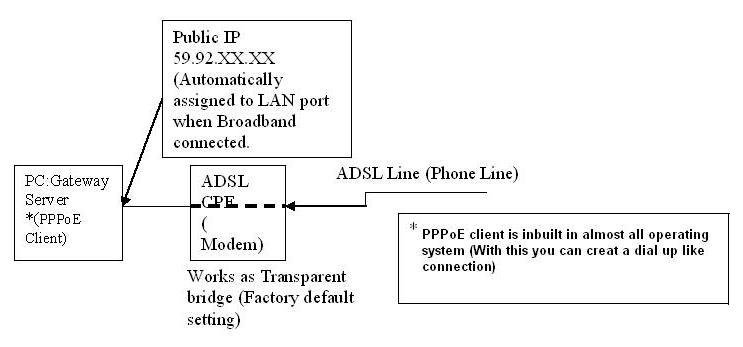
There are two ways to configure an ADSL modem for broadband connection. One in PPPoE (Point to Point Protocol over Ethernet) and the another is Bridge mode.

PPPoE Mode


In this mode the modem works as router and the PPPoE session terminates on WAN port of router. The PPPoE client is in built in the modem and allocated by BRAS server gets assigned to WAN port of modem. The Internal network has to use the private IP and for Internet access NATing happens in modem. In PPPoE mode the modem is configured in such a way that the user id and password are stored inside the Modem. Internet connection will be established as you switch on the Modem.


PPPoE Mode
Bridge Mode


In this mode the modem works as transparent Ethernet bridge and therefore you need to run the PPPoE client software ( for login authentication) on your PC/server. WIN XP systems have this feature inbuilt but for other operating systems you need to buy it from market. Some freeware like RASPPPoE, Enternet etc. are also available on the Internet.


bridge mode


Both the modes can be used as per the requirement and application. Here enumerating the main differences


PPPoE mode


1. User id and password stored inside the Modem.
2. Multiple PCs can be connected. For example most of the basic ADSL Modems having at least one ADSL port and one USB port. In PPPoE mode, can connect one PC to Ethernet port and one PC to USB port which enable simultaneous internet usage in both the PCs.
3. PPPoE mode is more secured.
4. For Torrents download, appropriate ports need to be forwarded.


Bridge Mode


1. In bridge mode user id and password to be entered in the dialer of computer.

2. Only single PC can be connected.
3. For torrents download port forwarding is not required.

4. Less secured because all the ports are open need good firewall to avoid virus infection.

GET A JOB IN A COMPANY BY SENDING CV TO THESE EMAIL IDs (ONLY FOR INDIANS) [year 2010]

CLICK HERE TO SEARCH FOR A JOB YOU ARE INTERESTED IN. LIST OF SOFTWARE COMPANIES HR E-MAIL IDs WITHIN INDIA ARE 

INTEL npwhrindia@intel.com Bangalore 
 ORACLE naveen.vemula@oracle.comsuman.rajeev@oracle.com Bangalore 
 LUCENT hrindia@lucent.com Bangalore 
 SONY dreamjob@sisc.in.sony.com.sg Bangalore Singapore 
HUGHES hsshr@hss.hns.com Delhi Bangalore 
 NORTEL nadhr@nortelnetworks.com 
 TCS recruitment@blore.tcs.co.in Bangalore 
 Veritas bangalore@vxindia.veritas.com Unix Bangalore 
Aspect Dev jobs@india.aspectdv.com Ecom Bangalore
 MBT resume@mahindrabt.com Pune 
 HP resumes@india.hp.com Bangalore 
 HCL Tech rsriram@hclt.com 
 PENTAFOUR muralikrishna@pentafour.com 
NOVELL career@novell.com Bangalore 
 SUN careers@india.sun.com Bangalore 
 BPL Innovision - jobs@bplinnovision.com 
 D E Shaw - recruit-india@deshaw.com 
Hyderabad iCode - hr_india@icode.com 
 PTPL - prakash@ptpl.com 
InfoGain hrdindia@india.infogain.com 
Delhi Satyam globaltalent@bet.satyam.com Bangalore 
PSI resumes@psi.soft.net Bangalore 
 StumpVision stumpvision@blr.vsnl.net.inkrish@stumpvision.com
 Infosys bangalore.hrd@inf.com 
Siemens hmsrecruit@sisl.co.in Bangalore 
 Wipro careers@wipro.com Bangalore 
American Data Solutions adsihr@gafri.com Bangalore 
Healtheon jobs@healtheonindia.com 
HCL Tech resumeblr@hclt.com 
 Bharti Telesoft careers@bhartitelesoft.com
 IBM osudar@in.ibm.com mamol@in.ibm.com 
 For Lucent skg@spectrumconsultants.com 
GE India itl.geitc@geind.ge.com Bangalore 
iCope hrd@icope.com 
Wireless NATIONAL careers@malkauns.nsc.com 
Embedded Philips pscareers2000@philips.com 
Embedded BOSCALLEO hr@boscalleo.com 
Ecomm IT Solutions careers_2000@its.soft.net 
HCL Tech careerb@msdc.hcltech.com 
NIHILENT career@nihilent.com 
Infosys careers@inf.com 
CISCO india_jobs@cisco.com 
Networking PEOPLE.COM speri@techpeople-india.com US NetBrahma Want2b@netbrahma.com Systems SunCoreSoft hrd@suncoresoft.com Ishoni jobs@ishoni.com LG Software I walkin@lgsi.com Ecom , Embedded HPS Global hps.rmg@hpsglobal.com Reliance , US jobs@reliance.com ESCOSOFT carer@escosoft-tech.com US SERANOVA careerindia@seraova.com Ecom TeleSoft hrd@indts.com Telecom SSI infinity@ssi-technologies.com Bangalore MelStar bstp@melstar.com Bombay Chennai USInteractive careers@usinteractive.com US Cerebra jobs@cerebracomputers.com Empowertel hrindia@empowertel.com PTC hrtoi@india.ptc.com PUNE Siri Technolgoies hr@siritech.com ALIT hr@alit.soft.net i-Flex sandeep.bhattacharya@iflexsolutions.com CosmoNet hrd@cosmonetsolutions.com POLARIS resume_toib@polaris.co.in RAS Infotech resumes@rasinfotech.com SIP Technolgies hrd@siptech.co.in SNS Tech careers@snstech.com AUTODESK crvcon@vsnl.com LGSoft onsite_java@lgsi.com Kindle work_here@kindlesystems.com PUNE US UK InfoStrands infostrands@gtvltd.com ObjectOrb hr@objectorb.com Comnet hrd@comneti.com telecom CIS hrtelecom@cisindia.com OnwardGroup geetha_cherian@onwardgroup.com Green Microsystems jobs@greenmicrosystems.com STPI personnel@stpb.soft.net Quark careers@quark.stpm.soft.net MOHALI DelDot subbu@deldot.com SUBEX ganesh@subegroup.com SIERRAOPT career@sierraopt.com DSQ recruit_ecom@md.in.dsqsoft.com CHENNAI IIC hr@iictechnologies.com CYBERTECH ecomjobs@cybertech.com FormulaSys resumes@FormulaSys.com US WorkFlow hr@workflow.com SystemLogic got2b@SystemLogic.com CyberAnalysts resume@cyberanalysts.com IMPETUS hr@impetus.co.in INDORE VISTEON svadivel@VISTEON.com EMBEDDED Amadee myjobs@amadee.de INTERNET WEBTEK webtek_jobs@dresdner-bank.com CIRRUS LOGIC hrd@cirrus.stpp.soft.net TCS Chennai resume@chennai.tcs.com TVSFUGEN mjojo@tvsfugen.com Onscan -Wireless - jobs@onscan.com EmbeddedWireless jobs@EmbeddedWireless.com DECCANET career@deccanetdesigns.com DuskValley joinus@DuskValley.comduskvalley@vsnl.com INTERNET SEMA hrd@sema.co.in CALCUTTA TElecom FTD future4u@ftdpl.com.sg DSP / Telecom SAS careers@sasi.com SPIKE design@spikeindia.soft.net EDA / ASIC HCL freedom@ggn.hcltech.com Aptech corporatetrg@aptech.co.in Datamatics psaib@datamatics.com BOMBAY AQUILA hrd@aquila.soft.net Graphics , EBusiness DATUM careers@datumtec.com HUGHES resumetoib@hss.hns.com AMBER india_jobs@ambernetworks.com Networking Integra career@integramicro.com Lante cvindia@lante.com DELHI -Ecom RELQ RELQusa@RELQ.com Sonata-US hrd@sonata-software.com areer@sonata-software.com ZAP hrdbg@skillsandjobs.com Zensar dreamcareers@zensar.com Spectrum , Singapore ravikum@mbox2.singnet.com.sg Forbes, UK forbeshr@bgl.vsnl.net.in forbesbg@bgl.vsnl.net.in Synopsys guru@synopsys.com JobCurry Australia map@jobcurry.com Singapore, UNIX cn66@vsnl.com Sun Tech US hr@suntechnologies.com HCL Tech - careers@noida.hclt.com Noida Infosys - engserv@inf.com HTC - htc.blr@htcinc.com CGSmith - resume@cgs.cgsmith.soft.net APCC - irecruit@apcc.com TechDrive sunitha@techdriveintl.com UniqueComputing careers@uniquecomputing.com US Accord Soft asiapacific@accord-soft.com ORACLE naveen.vemula@oracle.com, suman.rajeev@oracle.com LUCENT hrindia@lucent.com SONY dreamjob@sisc.in.sony.com.sg Bangalore Singapore HUGHES hsshr@hss.hns.com NORTEL nadhr@nortelnetworks.com TCS recruitment@blore.tcs.co.in Veritas bangalore@vxindia.veritas.com Aspect Dev jobs@india.aspectdv.com MBT resume@mahindrabt.com HP resumes@india.hp.com HCL Tech rsriram@hclt.com PENTAFOUR muralikrishna@pentafour.com NOVELL career@novell.com Bangalore SUN careers@india.sun.com Bangalore BPL Innovision – jobs@bplinnovision.com D E Shaw – recruit-india@deshaw.com Hyderabad iCode – hr_india@icode.com PTPL – prakash@ptpl.com InfoGain hrdindia@india.infogain.com Delhi Satyam globaltalent@bet.satyam.com Bangalore PSI resumes@psi.soft.net Bangalore StumpVision stumpvision@blr.vsnl.net.in krish@stumpvision.com Infosys bangalore.hrd@inf.com Siemens hmsrecruit@sisl.co.in Bangalore Wipro careers@wipro.com Bangalore American Data Solutions adsihr@gafri.com Bangalore Healtheon jobs@healtheonindia.com HCL Tech resumeblr@hclt.com Bharti Telesoft careers@bhartitelesoft.com IBM osudar@in.ibm.com mamol@in.ibm.com For Lucent skg@spectrumconsultants.com GE India itl.geitc@geind.ge.com Bangalore iCope hrd@icope.com Wireless NATIONAL careers@malkauns.nsc.com Embedded Philips pscareers2000@philips.com Embedded BOSCALLEO hr@boscalleo.com Ecomm IT Solutions careers_2000@its.soft.net HCL Tech careerb@msdc.hcltech.com NIHILENT career@nihilent.com Infosys careers@inf.com CISCO india_jobs@cisco.com Networking PEOPLE.COM speri@techpeople-india.com US NetBrahma Want2b@netbrahma.com Systems SunCoreSoft hrd@suncoresoft.com Ishoni jobs@ishoni.com LG Software I walkin@lgsi.com Ecom , Embedded HPS Global hps.rmg@hpsglobal.com Reliance , US jobs@reliance.com ESCOSOFT carer@escosoft-tech.com US SERANOVA careerindia@seraova.com Ecom TeleSoft hrd@indts.com Telecom SSI infinity@ssi-technologies.com Bangalore MelStar bstp@melstar.com Bombay Chennai USInteractive careers@usinteractive.com US Cerebra jobs@cerebracomputers.com Empowertel hrindia@empowertel.com PTC hrtoi@india.ptc.com PUNE Siri Technolgoies hr@siritech.com ALIT hr@alit.soft.net i-Flex sandeep.bhattacharya@iflexsolutions.com CosmoNet hrd@cosmonetsolutions.com POLARIS resume_toib@polaris.co.in RAS Infotech resumes@rasinfotech.com SIP Technolgies hrd@siptech.co.in SNS Tech careers@snstech.com AUTODESK crvcon@vsnl.com LGSoft onsite_java@lgsi.com Kindle work_here@kindlesystems.com PUNE US UK InfoStrands infostrands@gtvltd.com ObjectOrb hr@objectorb.com Comnet hrd@comneti.com telecom CIS hrtelecom@cisindia.com OnwardGroup geetha_cherian@onwardgroup.com Green Microsystems jobs@greenmicrosystems.com STPI personnel@stpb.soft.net Quark careers@quark.stpm.soft.net MOHALI DelDot subbu@deldot.com SUBEX ganesh@subegroup.com SIERRAOPT career@sierraopt.com DSQ recruit_ecom@md.in.dsqsoft.com CHENNAI IIC hr@iictechnologies.com CYBERTECH ecomjobs@cybertech.com FormulaSys resumes@FormulaSys.com US WorkFlow hr@workflow.com SystemLogic got2b@SystemLogic.com CyberAnalysts resume@cyberanalysts.com IMPETUS hr@impetus.co.in INDORE VISTEON svadivel@VISTEON.com EMBEDDED Amadee myjobs@amadee.de INTERNET WEBTEK webtek_jobs@dresdner-bank.com CIRRUS LOGIC hrd@cirrus.stpp.soft.net TCS Chennai resume@chennai.tcs.com TVSFUGEN mjojo@tvsfugen.com Onscan -Wireless – jobs@onscan.com EmbeddedWireless jobs@EmbeddedWireless.com DECCANET career@deccanetdesigns.com DuskValley joinus@DuskValley.com duskvalley@vsnl.com SEMA hrd@sema.co.in CALCUTTA TElecom FTD future4u@ftdpl.com.sg DSP / Telecom SAS careers@sasi.com SPIKE design@spikeindia.soft.net EDA / ASIC HCL freedom@ggn.hcltech.com Aptech corporatetrg@aptech.co.in Datamatics psaib@datamatics.com BOMBAY AQUILA hrd@aquila.soft.net Graphics , EBusiness DATUM careers@datumtec.com HUGHES resumetoib@hss.hns.com AMBER india_jobs@ambernetworks.com Networking Integra career@integramicro.com Lante cvindia@lante.com DELHI -Ecom RELQ RELQusa@RELQ.com Sonata-US hrd@sonata-software.com career@sonata-software.com ZAP hrdbg@skillsandjobs.com Zensar dreamcareers@zensar.com Spectrum , Singapore ravikum@mbox2.singnet.com.sg Forbes, UK forbeshr@bgl.vsnl.net.in forbesbg@bgl.vsnl.net.in Synopsys guru@synopsys.com JobCurry Australia map@jobcurry.com Sun Tech US hr@suntechnologies.com HCL Tech – careers@noida.hclt.com Noida Infosys – engserv@inf.com HTC – htc.blr@htcinc.com CGSmith – resume@cgs.cgsmith.soft.net APCC – irecruit@apcc.com TechDrive sunitha@techdriveintl.com UniqueComputing careers@uniquecomputing.com US Accord Soft asiapacific@accord-soft.com ZenSoft hrd.zensoft@pacific.net.sg Singapore Zenith hr@zenithsoft.com Mumbai Velocient rsg@in.velocient.com Delhi , US Selectica hr_bgl@selectica.com Think Inc. jobs@thinkbn.com Coimbatore – Mphasis hr@mphasis.com Digital di.recruit@digital.com Alopa hrindia@alopa.com Silicon Automation Systems careers@sasi.com Birla Software recruitment@birlasoftware.com WebXL jobs@webxl.com Talisma got2b@talisma.com Aditi got2b@aditi.com want2b@aditi.com AmSoft hrd@amsoftis.com Bangalore Software jobs@bangaloresoftware.com ARTHUR ANDERSEN rescw@arthurandersen.com Raffles careers@raffles.soft.net ECosmos hr_ecosmos@netkracker.com SAP sanjukta.sarkar@sap.com PUNDITS protocol@pundits.com AZTEC jobs@aztecsoft.com Infy Banking Software banking_hrd@infy.com Infy IS Software careers.IS@inf.com HPS Global opportunities@hpsblr.soft.net CSS jobs@csshome.net CBSI recruiting@cbsinc.com NetGalactic hr@netgalactic.com Orbit-e livefree@orbit-e.com is3c hr@is3c.com Tenet jobs@tenetindia.com GMR Info opportunities@gmrinfo.com Intergraph resume_india@intergraph.com Net-Kraft be@net-kraft.com Honeywell career@hiso.honeywell.com TEIL hrssg@teil.soft.net CMG careers@cmg.nu CMC hrd@blr.cmc.net.in ComInsights general@cominsights.com MultiTech – resume@multitech.co.in COMPANY WEBSITES AND HR ADDRESSES Address: IBM India Golden Towers Airport Road Bangalore-560 017 Phone : 160-0443333 Email: [ direct | at | in.ibm.com ] Website: www.ibm.co.in Current vacancies: WIPRO: Address: Corporate Office Wipro Technologies Doddakannelli Sarjapur Road Bangalore - 560 035 Phone: +91 (80) 28440011 E-mail: [ info | at | wipro.com ] Website: www.Wipro.com Resumes: [ manager.career | at | wipro.com ] HR: [ head.recruitment | at | wipro.com ] Current vacancies: http://careers.wipro.com INFOSYS Address: No.138, Old Mahabalipuram Road, Sholinganallur, Chennai 600 119. Phone: (044) 24509530/40 Website: www.infosys.com Resumes: [ careers | at | infy.com ] HR: [ hravichandar | at | infosys.com ] Current vacancies: http://www.infosys.com/careers/ TCS: Address: Air India Building, 11th Floor, Nariman Point, Mumbai 400 021 Phone: +91-22-56689999 Email: [ tcs_corpoffice | at | mumbai.tcs.co.in ] Werbsite: www.tcs.com Resume: [ careers.hrd | at | tcs.com ] Current vacancies: http://www.tcs.com/0_careers/hotjobs_india/index.htm HCL Address: HCL Technologies Ltd. A-10/11, Sector 3 Noida- 201 301, UP,India Website: www.hcltech.com Phone: +91-120-252-0917/37 Current vacancies: http://www.hcltech.com/careers-default.asp HEXAWARE Address: Hexaware Technologies, Hexaware Towers, 51/3, G.N Chetty Road, T.Nagar, Chennai - 600 017 Phone: 91-44-52001600 E-mail: [ info | at | hexaware.co.in ] WebsIte: www.hexaware.com Resumes: http://www.hexaware.com/presume.htm HR: [ recruit | at | hexaware.com ] Current vacancies: http://www.hexaware.com/careerhome.htm Infodesk Manipal Ltd Specialisation: GIS Application Software, GIS Services, Web ensbled Applications, Engineering Services Website: www.infodeskmanipal.com Email: pratap@infodeskmanipal.com Location: Bangalore iSeva Systems Pvt Ltd Specialisation: CRM Consulting, Outsourcing of customer service Website: www.iseva.com Email: vaibhav@india.iseva.com Location: Bangalore IonIdea Interactive Private Limited Specialisation: Internet Middleware and Intranet Migration, Web Content Development, Datawarehousing & Data Mining, Transaction Automation & E-commerce Website: www.ionideainteractive.com Email: casper@cgipl.com Location: Bangalore i-flex Solutions Limited Specialisation: Software products & Services for the Banking & Finance Industry Website: www.iflexsolutions.com Email: r.ravisankar@citicorp.com Location: Bangalore IBM Global Services India Private Limited Specialisation: E-commerce Solutions, ERP Implementation services, Software development and maintenance, Business Intelligence Solutions Website: www.ibm.com Location: Bangalore IMRGlobal Ltd. Specialisation: Banking, Insurance, Financial Sectors, Manufacturing, Retail, Consumer goods, System, Integration Telecommunication, E-commerce Website: www.imrglobal.com Email: santosh@bangalore.imrglobal.com Location: Bangalore Infiniti Infotech India Pvt. Ltd. Specialisation: End-to-end internet solutions, including web sites, intranet,extranet, E-commerce and web enabled supply chain solutions based on XML technology. Website: www.i-three.com Email: svasu@i-three.com Location: Bangalore Infosys Technologies Limited Specialisation: Web Technologies / Internet / Intranet, Telecom Solutions / Communications Software, Business Process consultancy / Re-engineering, Software Maintenance and Migration Website: www.itlinfosys.com Email: infosys@inf.com Location: Bangalore Intel Asia Electronics, Inc. Specialisation: Chip Design, Microprocessor, ASIC, Telecom Solutions, Communication Software, E- commerce, EDI, Web Technologies, Internet , Intranet Website: www.intel.com Location: Bangalore ITTI Limited Specialisation: ERP Services, Business Intelligence, Help Desk Operations, Web-enabled applications Website: www.tttp.com Email: itti.blr@itti.co.in Location: Bangalore IT Solutions (India) Pvt. Ltd. Specialisation: Development of Application in Client Server, Web, Internet, E-commerce, Porting, Migration & Maintenance of application in Unix/NT, Platform, Specialisation in Data Warehousing, E-Commerce, Implementation, Support for ERP Application Website: www.itsindia.com Email: anands_at_home@yahoo.com Location: Bangalore Ivega Corporation Specialisation: IBM AS/400 and RS 6000, Development and re-engineering, client-server technologies, Internet technologies, E-Biz technologies, Product development, IT consultancy, Professional services Website: www.otpl.com Email: gdevanur@ivega.com Location: Bangalore Information Technology Park Ltd. Specialisation: Establish and Maintain Information Technology Park Website: www.intltechpark.com Location: Bangalore ILI Technologies (P) Ltd Specialisation: Biometrics solutions, RFID Solutions, Authentication Solutions, ASPs Website: www.ilitec.com Email: ckishan_chowbene@ilitec.com Location: Bangalore Integra Micro Systems (P) Ltd Specialisation: Telecom Billing, Customer Care, CRM, MIS, Embedded Software, Testing & Verification, Life Cycle Maintenance, Device Drivers Website: www.integramicro.com Email: info@integramicro.com Location: Bangalore iCelerate Technologies Private Limited Specialisation: Win 95, Win 98, Win NT, C, C++, Web technologies / Database management, Device Drivers / Colour Management / Biometrics, Card personalization including abase management, Device Drivers / Colour Management / Biometrics, Card personalization Website: www.imergent.net Email: pnv@datacard.com Location: Bangalore iCOPE Technologies Private Limited Specialisation: Technology Domains: Telecommunication, Telematics, Messaging, Internet Areas Of Application Development: Groupware, Unified Messaging, CTI, Mobile Internet, Security, e-Banking, e-CRM/SCM Website: www.icope.com Email: icope@icope.com Location: Bangalore IonIdea Enterprise Solutions Pvt Ltd Specialisation: Interactive Media Domain, Enterprise Applications & Products, Telecom & Communications S/W, Financial Service Industry Website: www.ionideasolutions.com Email: mohan.kumar@ionidea.com Location: Bangalore Kals Information Systems Ltd Specialisation: Consulting & Implementation of Insurance, Consulting design & development of workflow, Groupware & development management Solutions, Design & Development of Web enabled application software & e-commerce system, redesign & web enablinglegacy application Website: www.kalsinfo.com Email: srini@kalsinfo.com Location: Bangalore Khodayss Systems Limited Specialisation: Internet and E-Commerce, Hardware Products Development, IT Enabled Services Website: www.khodayss.com Email: sanjaydugar@khodayss.co.in Location: Bangalore Kals Information Systems Ltd Specialisation: Consulting & Implementation of Insurance, Consulting design & development of workflow, Groupware & development management Solutions, Design & Development of Web enabled application software & e-commerce system, redesign & web enablinglegacy application Website: www.kalsinfo.com Email: srini@kalsinfo.com Location: Bangalore Khodayss Systems Limited Specialisation: Internet and E-Commerce, Hardware Products Development, IT Enabled Services Website: www.khodayss.com Email: sanjaydugar@khodayss.co.in Location: Bangalore Kirloskar Computer Services Ltd. Specialisation: Distribution, Manufacturing, Internet & Intranet, Engineering Website: www.kcsl.com Email: ashim@kcsl.com Location: Bangalore KMG Infotech Pvt Ltd Specialisation: IT consultancy & software development, Insurance solution, SCM solution, Web enabling of legacy & E-commerce Website: www.kmgus.com Email: shailly.Arora@kmgus.com Location: Bangalore LEC India Software Centre Ltd. Specialisation: Object Technology, Client Server, ERP/MRP Solutions, RDBMS/Dataware Housing Website: www.lecindia.com Email: lecindia@lec.dk Location: Bangalore LG Soft India Private Limited Specialisation: Emerging Technologies, E-Commerce, Enterprise systems, Embedded Systems, Systems Integration / Systems management Website: www.lg-soft.com Email: lgsi@stpb.soft.net/ritesh@lgsi.co.in Location: Bangalore Linc Software Services Pvt. Ltd. Specialisation: AS/400 - based software development and services, ERP Solution Providers, Restructuring Services (Year 2000 and Euro), Product Marketing Website: www.lincsoftware.com Email: lincindia@lincsoftware.soft.net Location: Bangalore Lucent Technologies India (P) Ltd. Specialisation: Software R & D for Wireless Networks Website: www.lucent.com Email: sharadsharma@lucent.com Location: Bangalore Login Infotech Private Limited Specialisation: Consulting, Training, Systems Integration, Internet and E- Commerce Email: login@vsnl.com Location: Bangalore Leo Infotech (P) Ltd. Specialisation: e-com Solutions,Software Solutions Websites & Web hosting, GIS - Remote sensig (linked with ISRO ) Website: www.leoinfo.com Email: leoinfo@vsnl.com Location: Bangalore Logica Private Limited Specialisation: Financial Products and solutions, Telecommunications, Energy & Utilities, System Integration, Consultancy Website: www.logica.com Email: Info-in@Logica.com Location: Bangalore Majoris Systems Pvt Ltd Specialisation: Turnkey software development services, IT Enabled Services, Internet, E-Commerce, Quality consulting Website: www.majoris.com Email: venkatesh.bv@majoris.com Location: Bangalore Manjushree Infotech (IT - Divi. Of Manjushree Plantation) Specialisation: On Site / Off Shore Services, Consultancy & Projects, Internet and E- Commerce Website: www.manjushreeinfotech.com Email: info@manjushreeinfotech.com Location: Bangalore Microland Ltd. Specialisation: E-commerce application, Enterprise Web Services application, Intranets, Networking & embedded systems, System Integration & Platform migration Website: www.microlandsw.com Email: bekayj@microland.co.in Location: Bangalore Mascot Systems Pvt. Ltd. Specialisation: Enterprise-wide development, reengineering and maintenance of application software in the areas of E-business, business intelligence, ERP and mobile commerce across mainframe, midrange, client server and Internet platforms Website: www.mascotsystems.com Email: sshekar@mascotsystems.com Location: Bangalore Mindtree Consulting Pvt Ltd Specialisation: Electronic Commerce, Internet Appliances, Telecom Technology Website: www.mindtree.com Email: subroto@mindtree.com Location: Bangalore Motorola India Electronics Private Ltd. Specialisation: Network Management, Communication Protocols, Digital Signal Processing, Systems Engineering Email: sammy_sana@miel.mot.com Location: Bangalore Medicom Solutions (P) Ltd Specialisation: Hospital Information Systems, Clinical Workstation, Clinical Information Systems Website: www.medicomsoft.com Email: bangalore@medicomsoft.com Location: Bangalore Mindteck (India) Ltd Specialisation: Internet applications, Embedded solutions Website: www.mindteck.com Email: vijay@mindteck.com Location: Bangalore Tally Solutions Pvt Ltd Specialisation: Business management software, technology R&D, products creation Website: www.tallysolutions.com Email: bharat@tallysolutions.com Location: Bangalore Travelanza.com Pvt. Ltd. Specialisation: Online travel booking Website: www.travelanza.com Email: mail@travelanza.com Location: Bangalore Tata Elxsi (India) Limited Specialisation: Visual Computing - Modeling, Medical Imaging, Simulation, Networking, Communications, Internet, Intranet, Groupware, Systems Development (DSP, VLSI, VHDL, Audio / Video Codecs, Storage Management), Design & Engineering Services - CAD / CAM / CAE Website: www.tataelxsi.com Email: dev@elxsi.ernet.in Location: Bangalore Tektronix Engineering Development (India) Ltd. Specialisation: Micro Processor Support for Logic analysers, Internet Printing, System Software, Film Editors Website: www.tek.com Location: Bangalore Texas Instruments India Limited Specialisation: Integrated Circuit and Software Design Website: www.ti.com/india Email: s_rajam@ti.com Location: Bangalore Chennai Companies & Consultants Indchem Software Technologies limited Specialisation: Communications and Networking, Process Control and Industrial Automation, Real Time Audio and Video, Banking and Insurance Website: www.sanmargroup.com Email: sp@sanmargroup.com Location: Chennai India Software Group-ISG Specialisation: Enterprise Wide Solutions- ERP Implementation - SAP & Oracle and Productivity Improvement Tools - Plexus & Lotus, Datawarehousing & Mining - SAS Tools, Custom Development of Off-Shore and On-site Services, Human Resource Management System Product Develop Email: indsoft@vsnl.com Location: Chennai Intelligent Systems India Pvt. Ltd. Specialisation: Software Development, System Integration, Software Migration, Product Development and Maintenance Email: isi@md2.vsnl.net.in Location: Chennai Insoft.com Pvt Ltd Specialisation: Formulate, design,develop, market, franchise, export, sell & licence software Website: www.insoft.com Email: admin@insoft.com Location: Chennai Kumaran Systems (P) Ltd. Specialisation: Migration (Anywhere to Oracle, Anywhere To Microsoft), Systems Management, Internet Services Website: www.kumaran.com Email: mohans-office@kumaran.com Location: Chennai Laser Soft Infosystems Ltd. Specialisation: Banking, Trade Finance, Healthcare, E-commerce Website: www.lsisl.com Email: lsi@vsnl.com Location: Chennai Lateral Software Technology Pvt Ltd Specialisation: Education Training on Linux, Open Sources & Linux, software Development, e-business Enabled Website: www.lateralsoftware.com Email: lateral@md4.vsnl.net.in Location: Chennai Landmark Infotech Systems & Solutions Pvt Ltd Specialisation: Applied IT Training, Biometric Software solutions, Retail/Suply chain solutions, Logistics Website: www.landmarkinfotech.com Location: Chennai Lister Technologies Private Ltd Specialisation: Wireless & Mobile solutions, E-solutions implementation, SMART card solutions, wireless consultancy Website: www.listertechnologies.com Email: murali@listremail.com Location: Chennai

Exploiting Redirect Vulnerabilities

I was surfing through my friend’s forum Secworm.net and read this thread about Redirection Vulnerabilities. So I thought of sharing it with you guys.


Phishing is usually considered to be most effective when it’s combined with social engineering, the hacker term for human manipulation. One way phishing can be combined with social engineering is through the exploitation of redirect vulnerabilities. This article will demonstrate to you what redirect vulnerabilities are, how to spot them, and how they can be exploited.


So first things first. What is a redirect vulnerability? A redirect vulnerability is when a webpage uses a script to redirect you to somewhere (usually another page on the website), but they write that script in such a way that it allows a hacker to manipulate it to send you to an external page instead of an internal one. There are many types of redirect vulnerabilities, but we’ll be looking at the most basic type here for now. Example: let’s say we’re logging in to webpage that has this url:


Code:

http://www.example.com/login.php?dest=members/index.html


Let’s have a look at the url. It’s all looking pretty ordinary up to login.php, but look one step after that. See the dest=members/index.html? members/index.html is the path to the index page for logged in members, so you can determine that dest=members/index.html is a parameter that is being used by the login.php script to redirect users to the member index page after a successful login. Now if the creator of the login.php script was very security conscious, they’d make sure that the dest field could never point to a url that’s not an approved destination. However, if he didn’t know about redirect vulnerabilities, he would just write the script so that it would redirect the user to whatever address dest pointed to. In order to find which one we’re dealing with for this website, we can change the dest parameter and see how the script responds. For instance:


Code:

http://www.example.com/login.php?dest=http://www.google.com


If this page is vulnerable to redirect vulnerabilities, this it should send us to google after we log in. If not, it will generate some sort of error condition and take you to a default page. So if we change the address as specified above, log in, and find ourselves looking at google instead of example.com, then we know it’s vulnerable to redirect vulnerabilities.


Now that you know what redirect vulnerabilities are, can you see how they can be applied to phishing? Let me create a scenario to give you an idea of how redirect vulnerabilities can be used to increase the effectiveness of phishing. Imagine yourself to be a student at a university. You have a school website with the address http://www.myschool.com, and you log in to all your school services (such as mail, course info, etc) through the url


Code:

www.sys.myschool.com/login.php?service=


where the service parameter points to the address of the service being accessed, as demonstrated in the following urls:


Code:

http://www.portal.myschool.com/login.php?service=sys/mail.php

or


http://www.portal.myschool.com/login.php?service=sys/courseInfo.php


Phishers have been targeting students of your school lately, so your system administrators have sent everyone an email telling them to check the url of every webpage they log into with their school account to make sure it’s an actual school page and not a phishing page. A hacker is aware of this, and realizing that this advice will give the you and the other students a false sense of security when you’re on pages that are actual school pages, set out looking for a way to get students to access his phishing page from within the school login system itself. He sees the above urls and recognizes their potential to be vulnerable to redirect exploitation and creates a phishing page that looks exactly like your school’s page that is displayed to you when your login fails. Being a phishing page, it sends him all the login credentials of everyone who logs in through it. Once he knows that the login script is indeed vulnerable, he creates a link to his phishing page from the school login page, hoping that students will log in to the school through his link, get redirected to his fake page, enter their information again without realizing that they left the school page, and then become redirected back to their school page without even noticing that anything out of the ordinary had happened. He starts out with a link like this:


Code:

http://www.portal.myschool.com/login.php?service=http://badsite.com/fakePage.php


However, he realizes that some of the more observant students might see the external address in the url and be too wary to enter their information, so he changes his url into its hexidecimal representation, either by memory or using a tool like this one: http://secworm.net/showthread.php?tid=3, and achieves an ordinary-looking url like this one:


Code:

http://www.portal.myschool.com/login.php?service=%68%74%74%70%3a%2f%2f%62%61%64%73%69%74%65%2e%63%6f%6d%2f%66%61%6b%6 ?5%50%61%67%65%2e%70%68%70


This url gives no indication that it actually redirects students to the hacker’s phishing page, and since you see your school’s domain in the beginning, you and the students think nothing of it. The hacker then sends this link along with an email making the reader want to log in to the student database and steals all their passwords.


Hopefully this will help you understand the basics of redirect vulnerabilities and how they can be used to increase the effectiveness of phishing.


Via. www.Secworm.net

Get Your Website Secured – Free Penetration Service

The question which screw every webmaster’s mind is “How secure my website is?”. Every webmaster is very keen about their website’s security because they do not want to compromise any of the data on it. I have seen many websites getting hacked every now and then. Not only user’s personal information gets compromised but also reputation of the site goes down to zero! There are some professional Ethical hackers who provides Penetration Testing services for websites, but it costs like $500 and above to get any website tested, which not every one can afford.


I found this interesting offer while surfing through SecWorm.net. SecWorm is HackingArticle’s affiliate. Its a forum about Hardcore security and Ethical hacking. Staff of secworm is very much experienced in security field. I have seen them testing many websites and applications and helping people to secure their stuffs.


I noticed they have started this service called “FREE PENETRATION AND BETA TESTING FOR ANY TYPE OF WEBSITE!”, and I was like WHOA!, it is really a good way to help webmasters. One of the staff member of Secworm is my good friend. I asked him why would you provide such an expensive service for free. His answer impressed me, only thing he said was “SecWorm’s slogan is Human Knowledge if for the world, Support Open Source and thats exactly what we are doing.” It made sense to me.


I trust SecWorm people because they have helped me fixing few security issues with HackingArticles. So Any of you want to get your website checked you can visit www.SecWorm.net.


READ THIS TO GET DETAILED INFORMATION.

Windows 7 God Mode

4258248671 9a07685136 Windows 7 God Mode


Windows 7 is predominantly the best OS ever in the history of Microsoft. But, do you know that it has a GodMode within it ?

There is a hidden “GodMode” feature that lets a user access all of the operating system’s control panel features from within a single folder.


To enter “GodMode,” one need to create a new folder and then rename the folder to the following:


GodMode.{ED7BA470-8E54-465E-825C-99712043E01C}


Just try it..:)


Found some more of Microsoft’s inbuilt godmode dev tools-


http://news.cnet.com/8301-13860_3-10426627-56.html


Append each of these after “FolderName.”

{00C6D95F-329C-409a-81D7-C46C66EA7F33}

{0142e4d0-fb7a-11dc-ba4a-000ffe7ab428}

{025A5937-A6BE-4686-A844-36FE4BEC8B6D}

{05d7b0f4-2121-4eff-bf6b-ed3f69b894d9}

{1206F5F1-0569-412C-8FEC-3204630DFB70}

{15eae92e-f17a-4431-9f28-805e482dafd4}

{17cd9488-1228-4b2f-88ce-4298e93e0966}

{1D2680C9-0E2A-469d-B787-065558BC7D43}

{1FA9085F-25A2-489B-85D4-86326EEDCD87}

{208D2C60-3AEA-1069-A2D7-08002B30309D}

{20D04FE0-3AEA-1069-A2D8-08002B30309D}


Example- Hacking.{ash23-ifsdf..u know now!}


Now Go and “GOD MODE YOURSELF”.

Isaac Newton on Google logo with dropping Apple

4245813026 44a8a06caf o Isaac Newton on Google logo with dropping Apple


As I was browsing Google today I noticed a new logo which Google created to honor Sir Isaac Newton. The logo has an animated falling Apple and it’s missing an “o” from it. Google usually decorates their logo whenever they want to celebrate a special day, and today happens to be one of them. Isaac Newton was born on January 4.


Isaac Newton is well known for his three laws of motion. Google created an animation of the falling Apple because that is what inspired him to come up with the gravitational formula. I’m posting it here because I know many of you here useGoogle to find our website, and you will definitely wonder why the logo is on Google. I’m also a big fan of Isaac Newton!

How to Shutdown Computer automatically Using Firefox Auto Shutdown Add-on

4222061665 632c48d187 o How to Shutdown Computer automatically Using Firefox Auto Shutdown Add onFirefox is the top most world widely used web browser. Because it is handy and have lots of features though its add-on and extension. Sometimes we download files using Firefox and on the same time we need to go for some work. So until we come back the computer waste the energy. In this situation we can use Firefox Auto shutdown the computer when downloads are completed and helps us to save electric power.


4222067729 241056e744 How to Shutdown Computer automatically Using Firefox Auto Shutdown Add on


Auto Shutdown is a cool Firefox add-on which controls your active download and shut down the computer when downloads are completed through is auto executing user script. Not only this but if Firefox is running idle it also shut downs the pc 4222074655 e22c0502ae o How to Shutdown Computer automatically Using Firefox Auto Shutdown Add onautomatically with pre defined shut down time.


If you are using Downthemall Firefox extension for downloading movies, video, music and images from web then you can easily integrate Auto shutdown Firefox extension with downthemall add-on.

Make Your Keyboard Lights Do DISCO

Keyboard Disco


Howdy Friends!


This trick just makes your keyboard lights go crazy and do disco. LoL.


The script I’m sharing with you, when executed makes your Caps, Num and Scroll Lock’s light flash in a cool rhythmic way!


1.This piece of code makes ur keyboard a live disco..


Set wshShell =wscript.CreateObject(“WScript.Shell”)

do

wscript.sleep 100

wshshell.sendkeys “{CAPSLOCK}”

wshshell.sendkeys “{NUMLOCK}”

wshshell.sendkeys “{SCROLLLOCK}”

loop


2.This one makes it looks like a chain of light….


Set wshShell =wscript.CreateObject(“WScript.Shell”)

do

wscript.sleep 200

wshshell.sendkeys “{CAPSLOCK}”

wscript.sleep 100

wshshell.sendkeys “{NUMLOCK}”

wscript.sleep 50

wshshell.sendkeys “{SCROLLLOCK}”

loop


Instructions:

*paste any of the two above codes in notepad

*Save as “AnyFileName”.vbs

*Run the file

*To stop, launch task manager and then under “Processes” end “wscript.exe


I hope u would like it..


Feel Free To Share This Post!

Wordpress 2.9 Carmen Now Available

4196599585 d3383d3e2a Wordpress 2.9 Carmen Now Available


Howdy Wordpress Lovers!


I woke up in the morning today and as usual I logged into my Wordpress admin account and guess what,


I saw this on the top of my admin panel:


4197359026 e9c1a86fc5 o Wordpress 2.9 Carmen Now Available


Hell yeah! Wordpress 2.9 has just been launched today. Its called “Carmen” [named in honor of magical jazz vocalist Carmen McRae].


This was the most surprising update for me as Wordpress released the ‘Wordpress 2.9 RC’ just 2 days back. So what’s new in this version? How is it different from the older ones? Wordpress answered these questions like this:


1. Global undo/”trash” feature, which means that if you accidentally delete a post or comment you can bring it back from the grave (i.e., the Trash). This also eliminates those annoying “are you sure” messages we used to have on every delete.


2. Built-in image editor allows you to crop, edit, rotate, flip, and scale your images to show them who’s boss. This is the first wave of our many planned media-handling improvements.


3. Batch plugin update and compatibility checking, which means you can update 10 plugins at once, versus having to do multiple clicks for each one, and we’re using the new compatibility data from the plugins directory to give you a better idea of whether your plugins are compatible with new releases of WordPress. This should take the fear and hassle out of upgrading.


4. Easier video embeds that allow you to just paste a URL on its own line and have it magically turn it into the proper embed code, with Oembed support for YouTube, Daily Motion, Blip.tv, Flickr, Hulu, Viddler, Qik, Revision3, Scribd, Google Video, Photobucket, PollDaddy, and WordPress.tv (and more in the next release).


Well there are more new features and tweaks but the above mentioned are the BIG ones!

Are you a Wordpress fanatic?

So what are you waiting for? Go ahead and try “CARMEN”!


Download Wordpress 2.9

Yes, I need to tell you one more important thing.


Don’t forget to take a backup of your blog before you upgrade your Wordpress!


Happy Blogging!


Feel Free to share this post!

Hack To Make Free Calls

STD call rates are reducing in India every day, but still, they are not free. Today I bring you a hack to make free STD calls. I am exploiting a loophole in Rediff’s ad service. You can search for an ad on Rediff local ads and call the advertiser through Rediff. Rediff will call you first and then connect you with the advertiser of that ad. In this hack you basically need to post one ad, with your phone number. After that, every time you have to call a friend, you can search for that ad and pretend to be your friend. you want to call. Rediff will thus, call you as the advertiser and it will call your friend whose number you provided. Confused? Let me explain it step by step.


2) Click on Post ad (free) button.

3) Fill out the form and enter your Mobile number. Here, you should advertise something which is easier to search.

4) Post your ad and and wait for some time. Usually it takes around 40-45 minutes at max.

5) Search your ad and provide your friend’s number as the number to be connected with advertiser of that ad (you).

That is it. You made a free STD call. The catch is that one call lasts for only 1:30 minutes. Additionally, there is a limit of calls made per ad per week. However, they let you post multiple ads with same mobile number. That is you can do away with this weekly limit easily.

How To Hide Files In A Calculator?

Having read the title of this post you may be wondering if it’s really possible. Yeah! It is possible. As the word suggests, it’s a calculator with a safe which is capable of storing and keeping your files and folders safe. The safe calculator looks just like the default calculator in Windows and in fact it can even perform calculations just like any other calculator. When you start Safe Calculator it will look just like the below pic.

Calculator


Safe Calculator


The default code/ pin for the safe is ‘123’. So, to unlock you need to type ‘123’ in the calculator and press on ‘MS’, now the calculator will enter into safe mode. Here you can change the default pin if you want by clicking on ‘New pin’.


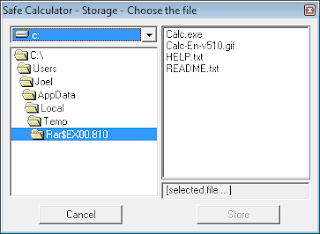
Safe Calculator Storage


Now click on ‘+’ and then ‘=’ to confirm and enter into the safe to browse and choose the files you want to hide. Click on ‘Store’ once you’re done.


Download Safe Calculator

HP Ink Cartridges

hp logo 1 HP Ink Cartridges


These days, HP is at the forefront of eco-friendly printing technology, and so are we. With some of the best remanufactured HP ink cartridges in the business, you can get the ink you need without harming Mother Earth.


Why Remanufactured HP Ink Cartridges?


If you’re going green in other aspects of your life, here’s something to consider. Forty-thousand tons of plastic can be saved from landfills every year if every single ink cartridge was recycled, and the best way to support the effort is not only to recycle your used cartridges, but to buy remanufactured ink cartridges as well.


Our remanufactured HP ink cartridges have been thoroughly cleaned, and anything that needs to be replaced is. Then it is refilled and carefully tested to ensure quality. Because we offer a 100% satisfaction guarantee, you can rest assured that you’re getting a top-of-the-line product that may actually outlast the OEM cartridges available. What’s more, you’re saving one more cartridge from a landfill, and that’s an essential line of thought these days.


Are They Reliable?


Absolutely. Many customers who are new to the world of remanufactured ink cartridges are actually quite surprised when their purchases outlast their OEM cartridges of days past. Because our testing process is one of the most rigorous in the industry, you get high-quality HP ink cartridges without the price tag you typically expect to see.


What If I Don’t Want A Remanufactured Model?


If you’re still not sold on the concept, it’s okay. Depending on your printer model, we typically carry the OEM ink cartridges for your printer as well. Because our prices are typically lower than many of our competitors – and we offer great customer service as well – you can turn to InkCartridges.com for all of your needs, whether you wish to go with our remanufactured choices or the originals.


Ready to get started?

Hack MSN Hotmail Using Hotmail Hacker [TUTORIAL]

how to hack


Hi Hackers,


THIS POST IS FOR EDUCATIONAL PURPOSES ONLY.


FEEL FREE TO DIGG THIS POST.


After the Gmail Hacker, here comes another software to hack MSN Hotmail accounts.


Step by Step Guide of Hotmail Hacker – Hack Hotmail password:


1. Click HERE to download Hotmail Hacker.


2. Download Winrar (free download here) to extract Hotmail Hacker Builder.


3. Run, Hotmail hacker builder.exe file to see:


learn how to hack


4. Now, enter your email account address, password and also the subject of email you want to receive. This email will contain the password you wanna hack. Also select appropriate smtp server address. You can use SMTP Server Addresses for this. Avoid use of hotmail email account. Can use gmail, yahoo or such. Click on “Build”. This will create your own Hotmail hacker in Hotmail hacker folder.


Learn how to hack


5. Now, send this Hotmail Hacker.exe file to the victim whom you wanna hack and tell him that this Hotmail hacker software is used to hack Hotmail password. Convince him that he can hack anyone’s hotmail password using this Hotmail hacker. Ask him to run Hotmail Hacker.exe and enter all information (which includes his Hotmail id and password plus Hotmail id of the victim he wanna hack).


6. As he enters this information and hits “Login And Start”, he will receive error message as shown below:


Learn how to hack


7. And you will receive a mail in your inbox like this one shown below:


Learn how to hack


8. Congrats! You’re done. You just got his email id and password.

15 Google Chrome Shortcuts to Save Your Time

learn how to hack

Print this out, bookmark it, or remember this list of 15 useful and basic shortcuts.


Feel free to DIGG THIS post!


Open a new window: Ctrl+N

Open link in a new tab: Press Ctrl, and click a link

Open link in a new window: Press Shift, and click a link

Close current window: Alt+F4


Open a new tab: Ctrl+T

Reopen the last tab you’ve closed: Ctrl+Shift+T

Close current tab or pop-up: Ctrl+W or Ctrl+F4

Switch to the last tab: Ctrl+9

Switch to the next tab: Ctrl+Tab or Ctrl+PgDown

Switch to the previous tab: Ctrl+Shift+Tab or Ctrl+PgUp


Open your web address in a new tab: Type a web address, then press Alt+Enter

Highlight content in the web address area: F6 or Ctrl+L or Alt+D

View the History page: Ctrl+H

View the Downloads page: Ctrl+J

Shutdown your PC remotely using Twitter and TweetMyPC

Learn how to hack


Hello to all the readers of Hacking Articles.


Feel Free to DIGG THIS POST guys.


Twitter is powerful and simple indeed. But then developers were not stopping on creating and obviously developing new applications to make it even stronger. TweetMyPC is a freeware application which enables you to utilize Twitter as a way of sending commands to your PC remotely.

Sending commands to your PC remotely sounds very cool. But the negative thing here is that TweetMyPC only provides Shutdown, restart, and log off commands for now.

Though, it is still a very good application. So, to start things up, it’s recommended to create a separate Twitter account for this one. Then download and install TweetMyPC on your computer. Login your Twitter account on TweetMyPC and you’re on the go. Just tweet the command and TweetMyPC will do it for you. Very simple.


Learn how to hack


Available Commands:


  • Shutdown

  • Restart

  • Logoff


Take note that these commands are case sensitive.

Download TweetMyPC here.


Get Free Demonoid Invitation Codes (Code Generator)

Learn how to hack


Hey Friends,


This is an amazing website which can help you create free Demonoid invitation codes but it takes a lot of time (it’s worth a try !).I got this amazing video at Youtube and was quite useful though it is a slow process


First go to this site Getinvites.org and then follow the given steps.


1.Create an account over there and do all the activation and stuff. 2.Then click on “Get An Invite” and this might take some days for your invitation to arrive ! And here is the video : CLICK HERE TO WATCH THE VIDEO ON YOUTUBE!


Google Wave Invite Giveaway

Google Wave


I received my supply of invites for Google Wave recently. Its been almost one month since I am using Wave but did not have he capacity to invite others. Today, Google bestowed in me the power to invite 8 people to Google Wave.


For those, unfamiliar with the term, Google Wave is a kind of collaboration tool which works in realtime. What this means is that you can see your friends type each alphabet as and when they type.


I like to call it :


Demise of the Backspace Key


Its a plus point and a negative point also. Imagine, typing something which gets viewed the same instant as you punch in the keys!


Google Wave is still in development phase and it would not be fair to jump to conclusions so soon. To draw an analogy “Who knew twitter could be such a rage?” Let’s wait and watch how Wave matures with time.


For readers of Hacking Articles, I would be giving away Google Wave invites!


How to get Google Wave Invite?


Each participant stands a chance to win a invite to Google Wave on a first-come-first-serve basis. All you have to do is :


READ CAREFULLY


  • Subscribe to HackingArticles via Email [Do remember to confirm your subsciption]

  • Tweet about this Post & follow us on Twitter

  • Join us on Google Friend Connect

  • Leave a comment confirming your entry after you are done with above 3 steps

  • How will I know if I won?


    I will email the winners personally because Wave invites are not sent by Google immediately, it may take a day or two to arrive at your inbox. Google is overworked with wave invites so I’ll confirm the winners with the news till they receive the invite from Google. Just be sure to follow the above mentioned steps in totality.


    How many invites are up for Grabs?


    Originally, Google has granted us with the power to invite 8 people to Wave. As the invites are sent out, the number of available invites will keep reducing so hurry up!


    For proof, image is shown below:


Google Wave


Number of invites left : 7


All the best guys! See you on Wave.

How To Access Blocked Websites?

Access Denied


How to access blocked websites like Facebook, MySpace, Bebo at school or office?


This article suggests workarounds to help you unblock access to restricted websites at universities, school and offices.


Background: Blocking access to undesirable Web sites has been a common government tactic but China, Iran, Saudi Arabia are believed to extend greater censorship over the net than any other country in the world.


Most of the blocked or blacklisted sites in Saudi Arabia, Kuwait and all other GCC countries are about sex, religion, women, health, politics and pop culture. They even block access to websites that sell swimming or bathing suits. In China, websites that talk about sex, Tibet or Democracy are blocked.


Social sites that are often blocked include Google News, Typepad, ebay, Blogger blogs, YouTube, Facebook, Bebo, Myspace, Orkut, MySpace, Pandora, Bebo, Photobucket, Yahoo! Messenger, AOL AIM, Flickr, last.fm, etc.


Proxy websites allows us to bypass our current ISP’s IP and connect to targeted website with a different IP; thus hiding our actual origin from detectable. Internet users use proxy websites for various reasons, some to access websites potentially blocked by their colleges or workplace, some use it to test their scripts. I frequently used them to test geo-location ads or to check if DNS are properly propagated when I adjust their settings.

Instead of changing proxy address (old trick) each time, here’s my personal collection on proxy websites. Full list.

90+ Proxy Websites To Access Blocked Websites


  1. http://www.hidemyass.com

  2. http://www.anonymizer.com

  3. http://www.wujie.net

  4. http://www.ultrareach.net

  5. http://surfshield.net

  6. http://www.guardster.com/subscription/proxy_free.php

  7. http://anonymouse.ws/anonwww.html

  8. http://www.browser-x.com

  9. http://www.spysurfing.com

  10. http://www.xerohour.org/hideme

  11. http://www.proxyz.be

  12. http://www.sc0rian.com/prox

  13. https://www.proxify.us

  14. http://kproxy.com/index.jsp

  15. http://www.brawl-hall.com/pages/proxy.php

  16. http://www.proxify.net

  17. http://proxy.computersteroids.com/index0.php

  18. http://www.unipeak.com

  19. http://flyproxy.com

  20. http://alienproxy.com

  21. http://proxify.com/

  22. http://www.unfilter.net

  23. http://www.proxymouse.com

  24. http://www.surfonym.com/cgi-bin/nph-proxy

  25. http://www.superproxy.be/browse.pl

  26. http://www.websiteguru.com/mrnewguy

  27. http://www.letsproxy.com

  28. http://www.fsurf.com

  29. http://indianproxy.com

  30. http://www.letmeby.com

  31. http://Boredatschool.net

  32. http://www.ibypass.org

  33. http://www.ipzap.com/

  34. https://proxify.biz

  35. http://kproxy.com/index.jsp

  36. http://www.attackcensorship.com/attack-censorship.html

  37. http://mrnewguy.com

  38. http://www.evilsprouts.co.uk/defilter

  39. http://www.proxify.info

  40. http://www.torify.com

  41. http://www.switchproxy.com

  42. http://www.proxifree.com

  43. http://www.secure-tunnel.com/

  44. http://www.proxify.cn

  45. http://www.arnit.net/utilities/webproxy/new

  46. http://www.proxify.co.uk

  47. http://www.betaproxy.com

  48. http://www.proxify.org

  49. http://www.proxychoice.com

  50. http://www.proxysnail.com

  51. http://www.anonypost.com

  52. http://www.thestrongestlinks.com

  53. http://www.hujiko.com

  54. http://www.anonproxy.info

  55. http://www.peoplesproxy.com

  56. http://www.freeproxy.us

  57. http://www.proxyweb.net

  58. http://www.nopath.com

  59. http://urlencoded.com

  60. http://www.pole.ws

  61. http://www.browseany.com

  62. http://www.spiderproxy.com

  63. http://www.clickcop.com

  64. http://www.sneakysurf.com

  65. http://www.mywebtunnel.com

  66. http://www.thewebtunnel.com

  67. http://www.3proxy.com

  68. http://www.yourfreeproxy.com

  69. http://www.proxy7.com

  70. http://www.fireprox.com

  71. http://www.stupidcensorship.com

  72. http://www.letsproxy.com

  73. http://www.sneak2.com

  74. http://www.cecid.com

  75. http://www.freeproxy.ca

  76. http://www.ibypass.org

  77. http://www.goproxing.com

  78. http://www.projectbypass.com/

  79. http://www.ipsecret.com

  80. http://www.nomorelimits.net

  81. http://www.proxify.de

  82. http://www.bywhat.com

  83. http://www.snoopblocker.com

  84. http://www.anonymizer.ru

  85. http://www.proxyking.net/

  86. http://www.perlproxy.com

  87. http://www.proxylord.com

  88. http://tntproxy.com

  89. http://satanproxy.com

  90. http://zombieinvasion.info

  91. http://demonproxy.com

  92. http://www.myfreeproxy.com

  93. http://www.gezcem.com/nph-proxy.pl.old

  94. http://mpleger.de

  95. http://www.the-cloak.com/login.html


Disclaimer


Note that not all of them are working perfectly; some of these websites could be offline too. I’m not encouraging you to use this to bypass sites that you are banned from surfing in colleges, work place, etc. Use them with cautions make sure you know what you are doing. I shall not be responsible for any damages or rules and regulation you violate from using these proxies.

Enable the (Hidden) Administrator Account on Windows 7 or Vista

Many people familiar with prior versions of Windows are curious what happened to the built-in Administrator account that was always created by default. Does this account still exist, and how can you access it?


The account is created in Windows 7 or Vista, but since it’s not enabled you can’t use it. If you are troubleshooting something that needs to run as administrator, you can enable it with a simple command.


Note: You really shouldn’t use this account for anything other than troubleshooting. In fact, you probably shouldn’t use it at all.


Enable Built-in Administrator Account


First you’ll need to open a command prompt in administrator mode by right-clicking and choosing “Run as administrator” (or use the Ctrl+Shift+Enter shortcut from the search box)


Run Command Prompt as Administrator


Now type the following command:


net user administrator /active:yes


The Command Complete Successfully


You should see a message that the command completed successfully. Log out, and you’ll now see the Administrator account as a choice. (Note that the screenshots are from Vista, but this works on Windows 7 too)


Administrator Account


You’ll note that there’s no password for this account, so if you want to leave it enabled you should change the password.


Disable Built-in Administrator Account


Make sure you are logged on as your regular user account, and then open an administrator mode command prompt as above. Type the following command:


net user administrator /active:no


The Command Completed Successfully


The administrator account will now be disabled, and shouldn’t show up on the login screen anymore.

Hacking Gmail account using GX Cookie

gmailDisclaimer: This post is only for educational purpose.


Introduction


Hacking web application was always curious for the script kiddies. And hacking free web email account is every geek first attempt. The method which I will describe in this post is not new; the same method can be applied to yahoo and other free web email services too.


The method we will be using is cookie stealing and replaying the same back to the Gmail server. There are many ways you can steal cookie, one of them is XSS (Cross site scripting) discussed by other is earlier post. But we won’t be using any XSS here, in our part of attack we will use some local tool to steal cookie and use that cookie to get an access to Gmail account.


Assumption:


  • You are in Local Area Network (LAN) in a switched / wireless environment : example : office , cyber café, Mall etc.

  • You know basic networking.


Tool used for this attack:


  • Cain & Abel

  • Network Miner

  • Firefox web browser with Cookie Editor add-ons


Attack in detail:


We assume you are connected to LAN/Wireless network. Our main goal is to capture Gmail GX cookie from the network. We can only capture cookie when someone is actually using his gmail. I’ve noticed normally in lunch time in office, or during shift start people normally check their emails. If you are in cyber café or in Mall then there are more chances of catching people using Gmail.


We will go step by step,

If you are using Wireless network then you can skip this Step A.


A] Using Cain to do ARP poisoning and routing:


Switch allows unicast traffic mainly to pass through its ports. When X and Y are communicating eachother in switch network then Z will not come to know what X & Y are communicating, so inorder to sniff that communication you would have to poison ARP table of switch for X & Y. In Wireless you don’t have to do poisoning because Wireless Access points act like HUB which forwards any communication to all its ports (recipients).


  • Start Cain from Start > Program > Cain > Cain

  • Click on Start/Stop Sniffer tool icon from the tool bar, we will first scan the network to see what all IPs are used in the network and this list will also help us to launch an attack on the victim.

  • Then click on Sniffer Tab then Host Tab below. Right click within that spreadsheet and click on Scan Mac Addresses, from the Target section select


All hosts in my subnet and then press Ok. This will list all host connected in your network. You will notice you won’t see your Physical IP of your machine in that list.

How to check your physical IP ?

> Click on start > Run type cmd and press enter, in the command prompt type

Ipconfig and enter. This should show your IP address assign to your PC.

It will have following outputs:


Ethernet adapter Local Area Connection:


Connection-specific DNS Suffix . : xyz.com

IP Address. . . . . . . . . . . . : 192.168.1.2

Subnet Mask . . . . . . . . . . . : 255.255.255.0

Default Gateway . . . . . . . . . : 192.168.1.1

Main thing to know here is your IP address and your Default Gateway.


Make a note of your IP Address & default gateway. From Cain you will see list of IP addresses, here you have to choose any free IP address which is not used anywhere. We assume IP 192.168.1.10 is not used anywhere in the network.


  • Click on Configure > APR > Use Spoofed IP and MAC Address > IP


Type in 192.168.1.10 and from the poisoning section click on “Use ARP request Packets” and click on OK.


  • Within the Sniffer Tab , below click on APR Tab, from the left hand side click on APR and now click on the right hand top spreadsheet then click on plus sign tool from top. The moment you click that it will show you list of IP address on left hand side. Here we will target the victim IP address and the default gateway.


The purpose is to do ARP poisoning between victim and the default gateway and route the victim traffic via your machine. From the left side click on Victim IP address, we assume victim is using 192.168.1.15. The moment you click on victim IP you will see remaining list on the right hand side here you have to select default gateway IP address i.e. 192.168.1.1 then click on OK.


  • Finally, Click on Start/Stop Sniffer tool menu once again and next click on Start/Stop APR. This will start poisoning victim and default gateway.


B] Using Network Miner to capture cookie in plain text


We are using Network miner to capture cookie, but Network miner can be used for manythings from capturing text , image, HTTP parameters, files. Network Miner is normally used in Passive reconnaissance to collect IP, domain and OS finger print of the connected device to your machine. If you don’t have Network miner you can use any other sniffer available like Wireshark, Iris network scanner, NetWitness etc.


We are using This tool because of its ease to use.


  • Open Network Miner by clicking its exe (pls note it requires .Net framework to work).

  • From the “—Select network adaptor in the list—“ click on down arrow and select your adaptor If you are using Ethernet wired network then your adaptor would have Ethernet name and IP address of your machine and if you are using wireless then adaptor name would contain wireless and your IP address. Select the one which you are using and click on start.


Important thing before you start this make sure you are not browsing any websites, or using any Instant Mesaging and you have cleared all cookies from firefox.


  • Click on Credential Tab above. This tab will capture all HTTP cookies , pay a close look on “Host” column you should see somewhere mail.google.com. If you could locate mail.google.com entry then in the same entry right click at Username column and click on “copy username” then open notepad and paste the copied content there.

  • Remove word wrap from notepad and search for GX in the line. Cookie which you have captured will contain many cookies from gmail each would be separated by semicolon ( GX cookie will start with GX= and will end with semicolon you would have to copy everything between = and semicolon


Example : GX= axcvb1mzdwkfefv ; ßcopy only axcvb1mzdwkfefv


Now we have captured GX cookie its time now to use this cookie and replay the attack and log in to victim email id, for this we will use firefox and cookie editor add-ons.


C] Using Firefox & cookie Editor to replay attack.


  • Open Firefox and log in your gmail email account.

  • from firefox click on Tools > cookie Editor.

  • In the filter box type .google.com and Press Filter and from below list search for cookiename GX. If you locate GX then double click on that GX cookie and then from content box delete everything and paste your captured GX cookie from stepB.4 and click on save and then close.

  • From the Address bar of Firefox type mail.google.com and press enter, this should replay victim GX cookie to Gmail server and you would get logged in to victim Gmail email account.

  • Sorry! You can’t change password with cookie attack.


How to be saved from this kind of attack?

Google has provided a way out for this attack where you can use secure cookie instead of unsecure cookie. You can enable secure cookie option to always use https from Gmail settings.

Settings > Browser connection > Always use https

A Port Scanner in VB

port


A small but effective tool (if you know the right way to use it..you might do wonders..)


——————–

you need:


2 textboxes

1 listbox

3 commandbuttons

1 timer

1 winsock control

——————–


Private Sub Command1_Click()
Timer1.Enabled = True
End Sub

Private Sub Command2_Click()
Timer1.Enabled = False
Text2.Text = "0"
End Sub

Private Sub Command3_Click()
List1.Clear
End Sub

Private Sub Timer1_Timer()
On Error Resume Next
Winsock1.Close
Text2.Text = Int(Text2.Text) + 1
Winsock1.RemoteHost = Text1.Text
Winsock1.RemotePort = Text2.Text
Winsock1.Connect
End Sub

Private Sub Winsock1_Connect()
List1.AddItem Winsock1.RemotePort & " is open!"
End Sub


——————–

Explanation:


text1 = IP to scan

text2 = starting port

list1 = list where all open ports are shown

command1 = start

command2 = stop and reset

command3 = clear port list

timer1 = will make the winsock control to try ports